
Messages
Clear held orders from Notifications (PO box, missing driver license, unanswered intake, unpaired product), answer patients, escalate to a provider, message your network, and call patients.
Messages is where you answer patients, clear held orders from Notifications, and talk to your team and provider network. Left menu → Messages. Client Admin and Client Staff (not review-only clients).
What you can do here
- Find out why an order is on hold, and clear it
- Answer a patient
- Get a provider to answer a clinical question
- Message your provider network, a provider or a teammate
- Resolve, archive or mute a conversation
- Call a patient
Find out why an order is on hold, and clear it
Use this first thing each day, or from the dashboard's Open notifications.
Open Notifications
Top of the sidebar. The number is how many alerts need you.
Read the alert
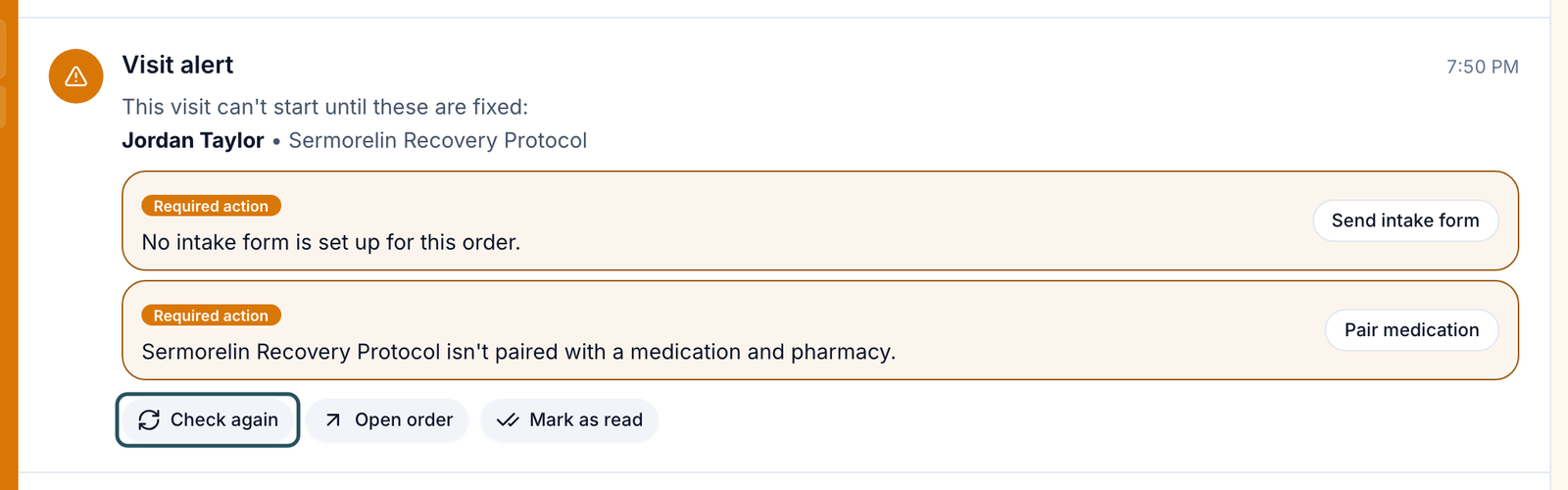
Each Visit alert or Order alert names the patient and product and lists every Required action.
Fix each item
Click the button under it: Edit patient, Send intake form, Pair medication, Open products, Add driver license, Set up payment or Manage pharmacies (see Hold reasons).
Click Check again
The order is rechecked at once. Open order shows its details; Mark as read clears it from your count.
You'll know it worked when the toast reads All set. This order can move ahead. If anything is left: This order is still on hold. Fix the remaining items, then check again.
Who can do this: Client Admin and Client Staff. Pairing products and adding pharmacies are Client Admin work.
Answer a patient
Open the conversation
Unreads shows what's new for you; patients are under Patients, or use Find a conversation.
Write and send
Type in the box at the bottom and click Send. The button beside it shows how the patient is texted: Full text sends the whole message, Secure only a link. Click it to switch.
You'll know it worked when your message appears in the thread.
Who can do this: Client Admin and Client Staff.
A patient can't message you until they have an order, unless a Client Admin turns on Allow messaging without an order in Settings → Portal experience. Unreads is per person: a colleague's reply doesn't clear yours.
Get a provider to answer a clinical question
Use this for dosing, side effects or other clinical questions.
Open Conversation actions
In the patient's conversation, click ⋮ at the top right, then Request provider assistance.
Send the request
Pick Provider assistance, Medical assistance or Other clinical concern, add an Internal note (the patient doesn't see it), and click Send request.
You'll know it worked when the toast reads Provider assistance requested. and the conversation shows Needs provider. Escalated at the top lists every open request.
Who can do this: Client Admin and Client Staff. The option is missing while a request is already open.
Message your provider network, a provider or a teammate
Use this for operational questions. There is no Provider Network tab any more.
Click New message
The + at the top of the sidebar.
Type a name
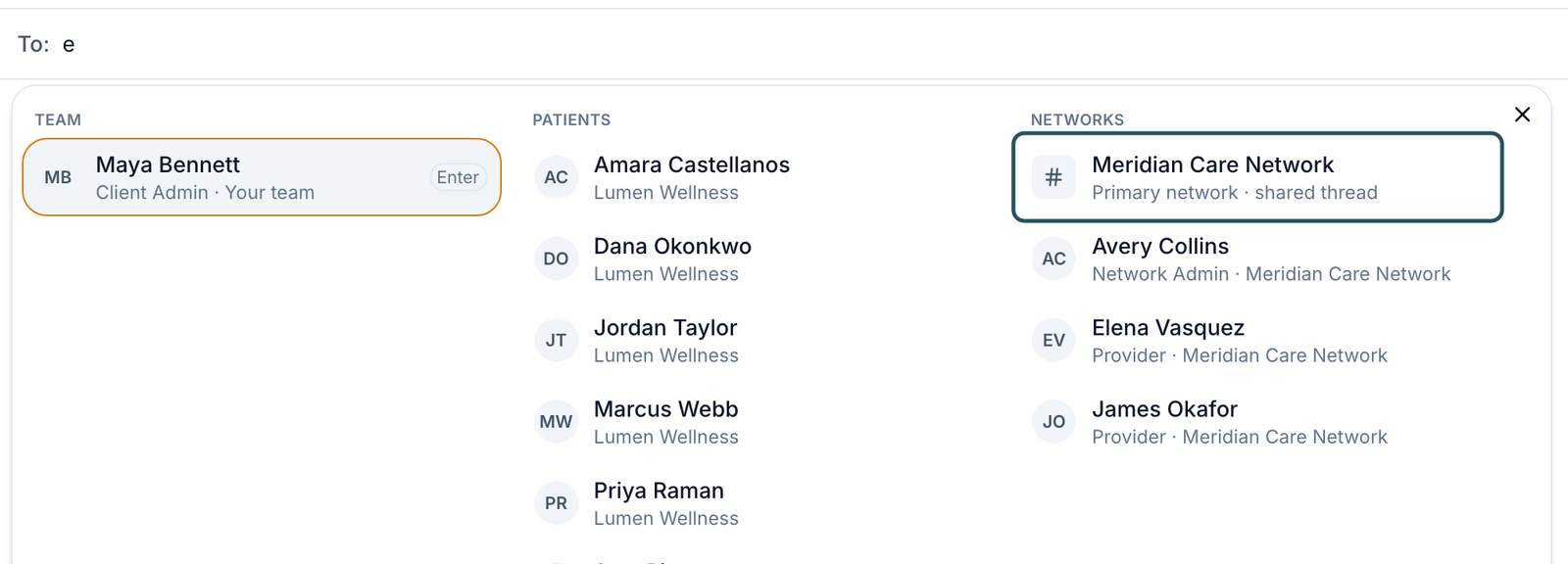
In To:, type part of a name. Results are grouped under TEAM, PATIENTS and NETWORKS.
Pick who
Your network's Primary network · shared thread is the Network chat; its admins and providers are listed below it. Browse message types offers Teammate, Patient, Network chat and Network staff.
You'll know it worked when the conversation opens with the network or person in the header.
Who can do this: Client Admin and Client Staff, unless your network switched Network chat or Network staff off.
Resolve, archive or mute a conversation
Open the row menu
Hover the conversation in the sidebar and click ….
Choose
Resolve conversation (while the patient waits for a reply; shared with your team), Archive until next reply (only you), or Mute notifications for a set time.
You'll know it worked when it moves to Resolved or Archived at the bottom of the sidebar, until the patient writes again.
Who can do this: Client Admin and Client Staff.
Call a patient
Start the call
In the patient's conversation, ⋮ → Call patient (or the call button on the patient profile).
Confirm
Click Start call and allow your microphone.
You'll know it worked when the call panel opens and rings the patient.
Who can do this: Client Admin and Client Staff, once GEN Health has set up a phone number for your account and the patient has a phone number. Ask in Support for a number.
Hold reasons you'll see in Notifications
| The alert says | What it means | Who acts next | What you do |
|---|---|---|---|
| The delivery address is a PO Box. / …home address is incomplete. | The pharmacy can't ship | You | Edit patient: enter a full street address |
| …needs the patient's driver license number and state. | The pharmacy requires ID | You | Add driver license, fill it in, Save driver license |
| No intake form is set up for this order. / …intake form has no answers yet. | The provider has nothing to review | Patient | Send intake form, then message the patient |
| …isn't paired with a medication and pharmacy. / …isn't linked to a product in your catalog. | Catalog setup is missing | Client Admin | Pair medication or Open products |
| …has no payment method on file. | Your pharmacy account can't be charged | You | Set up payment and add a card |
| None of your pharmacies deliver to the state | No pharmacy covers that state | Client Admin | Manage pharmacies |
What can go wrong
| What you see | Why | Fix |
|---|---|---|
| A patient says they can't send a message, or has no Messages tab | No order yet | Ask a Client Admin to turn on Allow messaging without an order. |
| A conversation stays unread after a colleague replied | Unread is per person | Open it yourself. |
| Something went wrong, taking you back to a safe place | Known problem on some conversations | Refresh. If it repeats, raise a ticket in Support with the patient's name. |
| Your network says it can't see a patient's reply | Known problem on some conversations | Raise a ticket in Support with the patient's name. |
Questions people ask
Where did the Provider Network tab go?
Tabs were replaced by the sidebar. Start a New message, type your network's name and pick the shared thread; after that it stays in your sidebar.
Why are these prescriptions still pending?
Open Notifications. If it says Pair medication, pair the product, then click Check again.
How do I send this patient a note to finish onboarding?
New message → type their name → pick them under PATIENTS. If they can't sign in, send a magic link from Patients.
Can we text patients from GEN Health?
Yes, once GEN Health assigns your account a local number; ask in Support with the area code you want. Secure texts only a link.
When our patients message, will the providers get notified?
Yes, for conversations they are part of. For anything clinical, use Request provider assistance so it reaches the provider inbox.
Related
Was this helpful?