
Settings — Payments
Connect or switch the patient payment processor, set the default shipping price, and turn on saved-card charges and split-3 installments for API orders.
Settings — Payments holds the payment processor that charges your patients, plus the default shipping price and two options for orders your website sends through the API. Left menu → Settings → Payments. Client Admin only. Affiliate accounts don't see the processor card; their provider network's processor takes payments.
What you can do here
- Connect or switch the payment processor
- Set the default shipping price
- Charge saved cards when a provider approves
- Offer pay-in-full or split-3 billing
Connect or switch the payment processor
Use this to take real card payments, or to change processor. This Payment processor card is the same one as on Billing; a change in either place applies to both.
Save the keys
Click Edit on your processor's tile, paste the keys, then Test connection and Verify and save.
Make it live
Click Activate on the tile.
You'll know it worked when the tile gets a green outline and check mark. Field names per processor are in Billing.
Who can do this: Client Admin.
Set the default shipping price
Use this to charge the same shipping on every product that has no shipping price of its own.
Type the amount
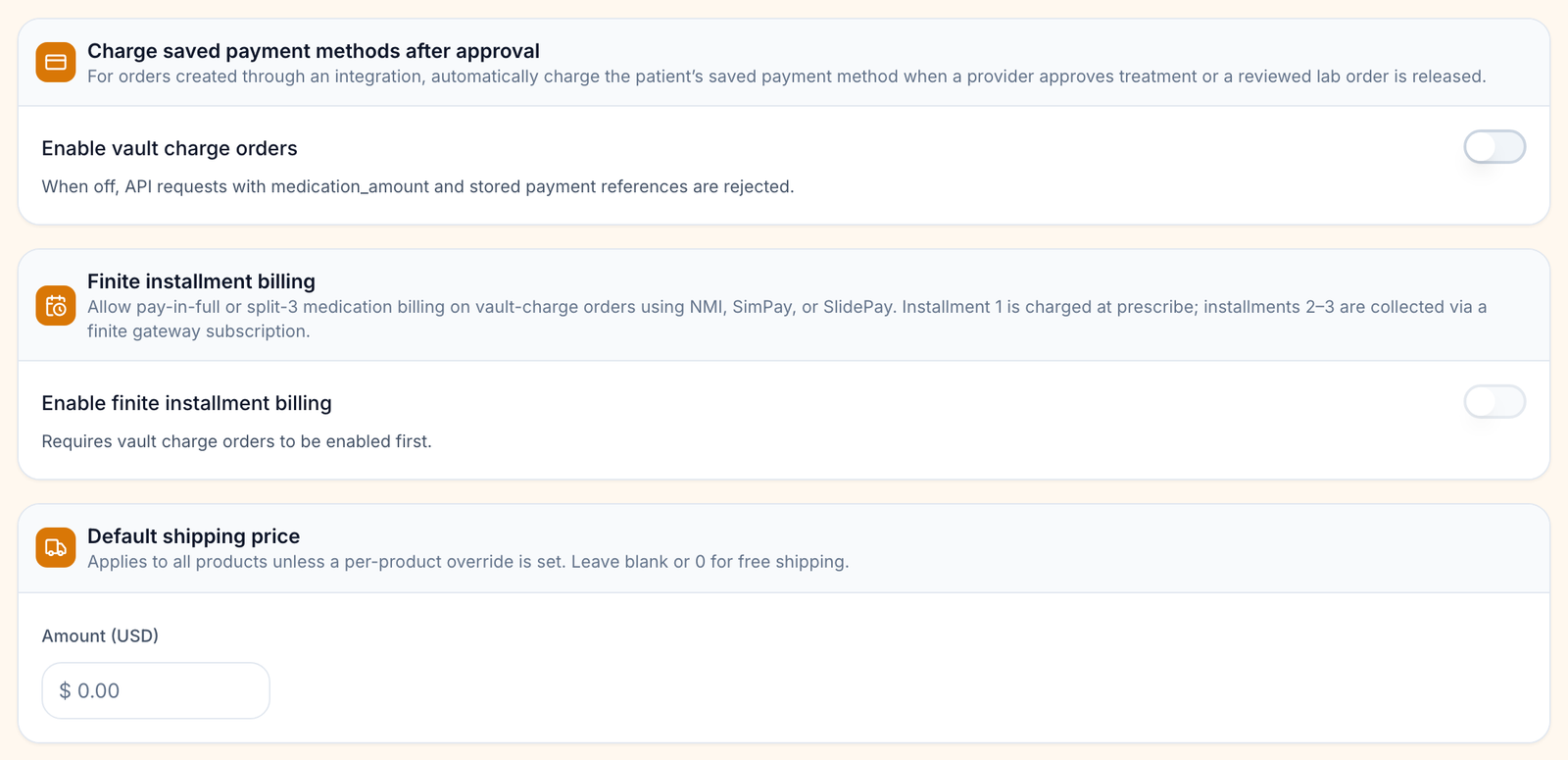
Under Default shipping price, type a number into Amount (USD), for example 7.50. Leave it blank or 0 for free shipping.
Leave the field
Press Enter or click elsewhere; it saves then.
You'll know it worked when the toast reads Default shipping price updated.
Who can do this: Client Admin. A product's own shipping price beats this one.
Charge saved cards when a provider approves
Use this if your website sends orders through the API with a saved card, and you want GEN Health to charge that card once a provider approves treatment or a reviewed lab is released.
Turn it on
Under Charge saved payment methods after approval, tick Enable vault charge orders. It saves at once.
You'll know it worked when the toast reads Vault charge orders enabled.
Who can do this: Client Admin. While it is off, API orders that carry a medication amount and a stored card are rejected.
Offer pay-in-full or split-3 billing
Use this to let API orders pay for medication in three installments through NMI, SimPay or SlidePay.
Turn on vault charges first
Enable finite installment billing is greyed out until Enable vault charge orders is on.
Turn it on
Tick Enable finite installment billing. The first installment is charged when the prescription is written; the other two are collected by your gateway.
You'll know it worked when the toast reads Finite installment billing enabled.
Who can do this: Client Admin. Refunds on installment orders stay with Client Admin.
Statuses you'll see here
| Status | What it means | Who acts next | What you do |
|---|---|---|---|
| Green check and outline | The live processor | No one | Nothing |
| None active | Test mode — no real charges | You | Connect a processor before launch |
| Saved / Verified | Keys stored, not live | You | Activate to switch |
| Missing keys | Active without keys; checkout is broken | You | Edit and save the keys |
What can go wrong
| What you see | Why | Fix |
|---|---|---|
| Typed a shipping price and nothing happened | It saves when you leave the field. | Press Enter; look for the toast. |
| Shipping charged is different from the default | The product has its own shipping price. | Change it on the product in Products. |
| Enable finite installment billing greyed out | Vault charges are off. | Turn on Enable vault charge orders first. |
| No Payment processor card | Affiliate account. | Ask your provider network which processor is live. |
| Looking for the card GEN Health charges you | That is a different page. | Settings → Account and billing. |
Questions people ask
What is the difference between Payments and Billing?
Both show the same Payment processor card. Billing adds the list of patient charges; this page adds shipping and the API payment options.
Where do I set the price the pharmacy charges us?
You don't; that is the pharmacy's price, shown on Formulary. The card that pays the pharmacy is on Integrations.
Related
Was this helpful?