
Orders
Why an order is stuck or on hold, where the tracking number is, and how to remind patients to pay, mark an order paid, refund, cancel, and release held labs.
Orders shows every purchase your patients make and what each one is waiting on. Left menu → Orders. Client Admin and Client Staff.
What you can do here
- Find why an order is stuck
- Give the patient tracking
- Remind patients to pay
- Mark an order paid
- Invoice a patient
- Refund or void a payment
- Cancel or hold an order
- Release a held lab
Find out why an order is stuck or on hold
Use this when a patient asks "where is my order?"
Read the status
The Status pill says whose move it is (see Statuses). The Action needed filter shows orders waiting on your team.
Read the History
Click the row. In Order Details, the top History line names the blocker, for example Patient action needed: complete forms.
Check held visits
Open Messages → Notifications. Each Visit alert names what to fix, such as a PO box address or missing driver license, with a button like Send intake form.
Recheck
After fixing, click Check again.
You'll know it worked when the alert clears and the order moves to provider review.
Who can do this: Client Admin and Client Staff.
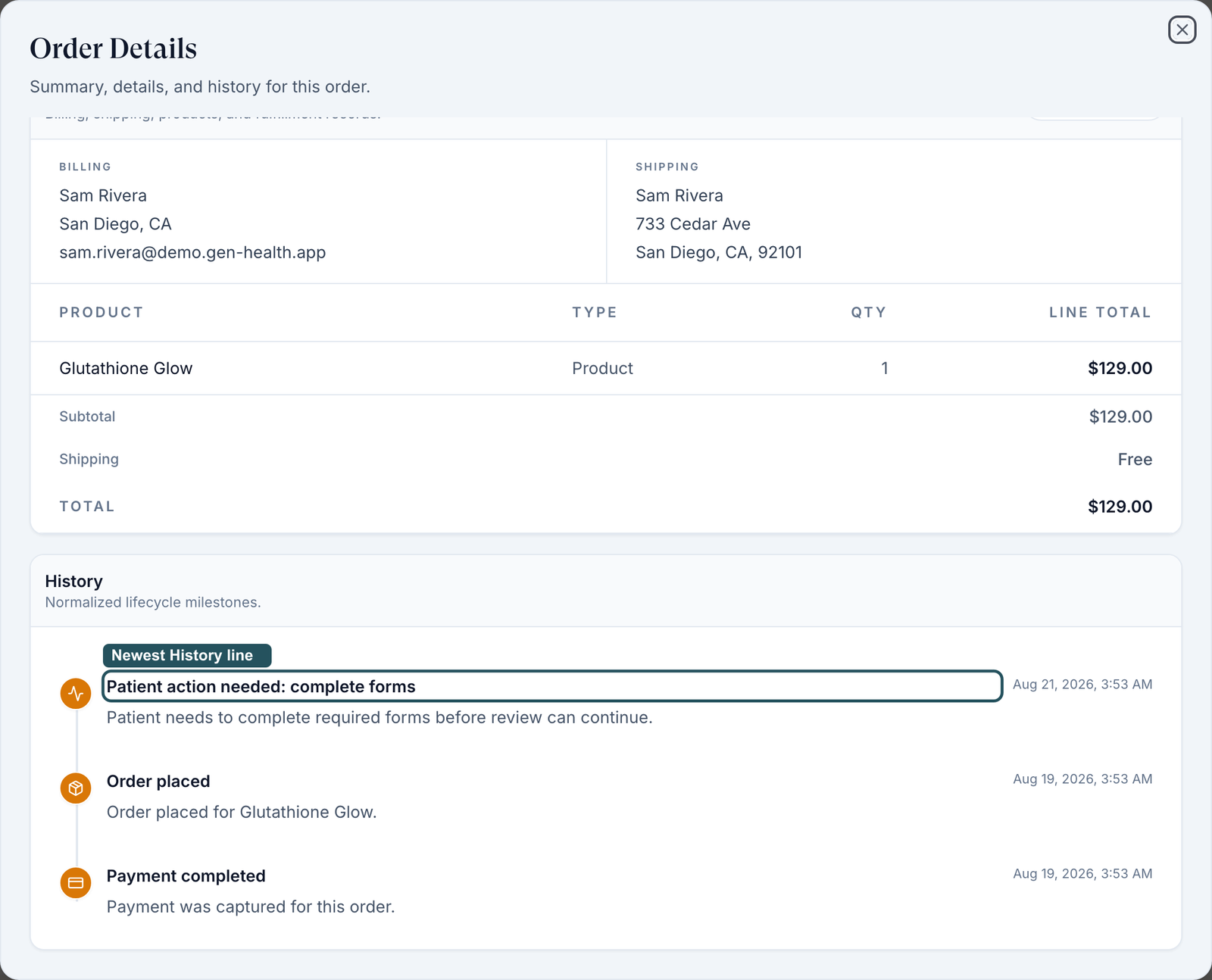
Who handles what: review statuses belong to your provider network (message them); pharmacy statuses to OnlyScripts (Support ticket).
Give the patient a tracking number
Use this when the patient asks where their package is.
Look under the status
After shipping, a Tracking number appears under the pill; click it.
Or open the order
Fulfillment shows the carrier and number. Lab kits have Track shipment.
You'll know it worked when the carrier page opens. No tracking yet means the pharmacy has not shipped.
Who can do this: Client Admin and Client Staff.
Remind patients to pay
Use this when orders sit at Pending Payment.
Turn on Bulk
Click Bulk, then Select all unpaid (n) or tick rows.
Send
Click Send reminder, check the list, then Send N reminders.
You'll know it worked when the toast reads Payment reminder sent for N orders. For one patient: ⋮ → Send email.
Who can do this: Client Admin (see What can go wrong for staff).
Mark an order paid
Use this when the patient paid you directly, by terminal, cash or phone.
Open the row menu
Click ⋮ → Mark as paid.
Type confirm
Type confirm; no card is charged.
Record it
Click Mark as paid.
You'll know it worked when the toast reads Payment recorded. Order progression has resumed.
Who can do this: Client Admin, on product, lab and payment-request orders (not affiliate accounts).
In a clinic: there is no card reader here. Charge your terminal, mark the order paid, and refund on the terminal.
Request a payment (invoice a patient)
Use this to bill for something outside your catalog.
Start
Click Create order (top right) and pick the patient.
Describe it
Fill Order title, then each line under Line items (Add item for more) and Shipping.
Send
Request payment emails the patient a payment prompt; Save order does not notify them.
You'll know it worked when the toast reads Payment request sent to patient.
Who can do this: Client Admin; Client Staff with Create payment requests in Staff permissions.
Refund or void a payment
Use this to return all or part of a payment.
Open it
Click the status pill → Issue Refund, or ⋮ → Refund.
Fill it
Enter Refund Amount ($) (up to Max refundable) and a Reason.
Issue it
Click Issue Refund. Unsettled card payments offer Void payment instead.
You'll know it worked when the status reads Refunded or Partially Refunded.
Who can do this: Client Admin; Client Staff with Issue refunds and void payments in Settings → Staff permissions.
Cancel an order, or put it on hold
Cancel stops an order; a hold pauses it until you release it.
Cancel
⋮ → Cancel order, then confirm. Several at once: Bulk → Cancel orders.
Hold
Status pill → Put on Hold, add a reason, click Put on hold. To release, click the On hold pill → Release hold.
You'll know it worked when the pill reads Cancelled or On hold.
Who can do this: Client Admin and Client Staff.
Cancelling never refunds, and neither step recalls a prescription the pharmacy already has.
Release a held lab, or mark a draw complete
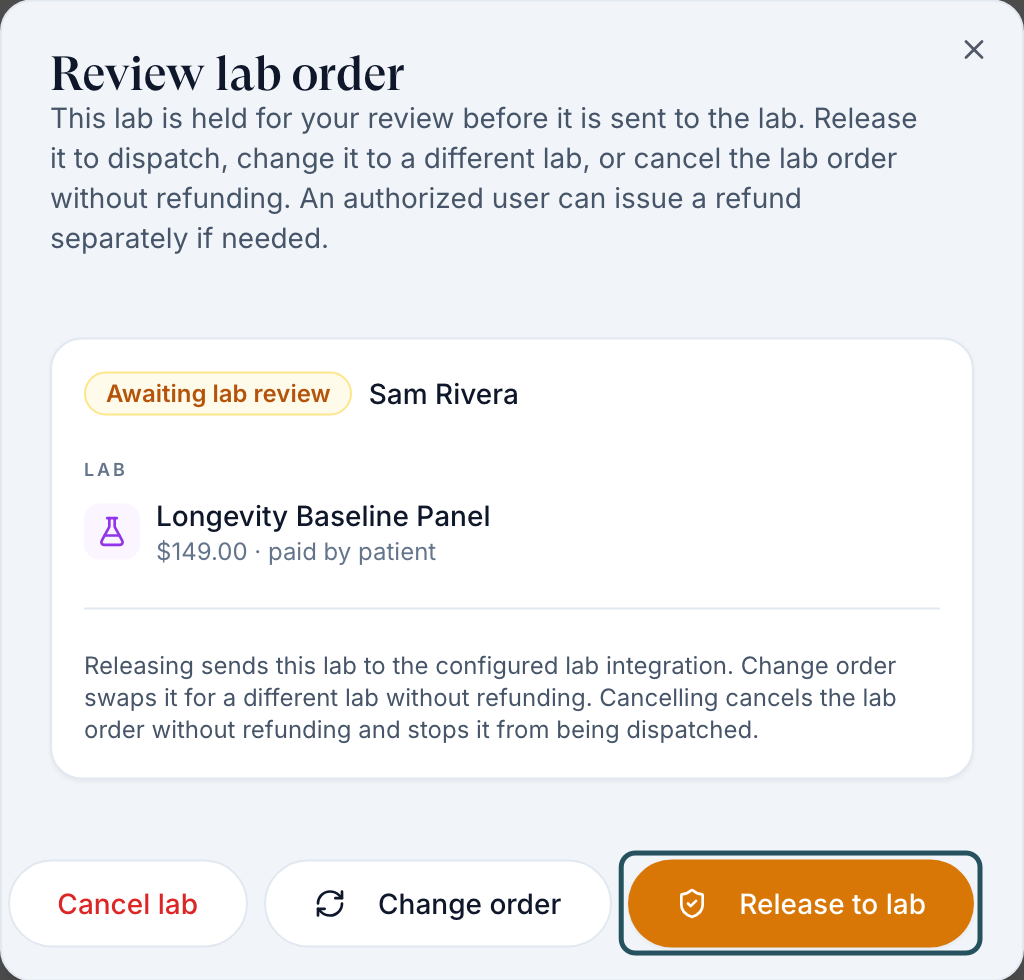
Use this when a lab shows Awaiting Lab Review.
Open it
Click Review lab in the Action column.
Decide
Release to lab, Change order or Cancel lab. None of them refunds.
You'll know it worked when the toast reads Lab order released — sending to the lab.
Who can do this: Client Admin. Client Staff see Awaiting review.
In a clinic: after an on-site draw, open the order and click Mark draw complete (both roles).
What's on this page
| Control | What it does |
|---|---|
| Awaiting Rx review | Prescriptions held for your price check; click Review. |
| Status pill labels | Shipped, Delivered, Error and your own labels. Nothing ships or charges. |
| Export CSV | Downloads the rows shown. |
Statuses you'll see here
| Status | What it means | Who acts next | What you do |
|---|---|---|---|
| Pending Payment | Not paid | Patient | Remind, or mark paid |
| Pending Forms | A required form is unfinished | Patient | Resend it from the profile |
| Pending Review / Under Review / Deferred | With a provider, or they need more | Provider network | Message them if it sits |
| Approved | Provider said yes; prescription in progress | Network or pharmacy | Follow it on Prescriptions |
| Sent to Pharmacy | The pharmacy has it | Pharmacy | Wait for tracking |
| Shipped / Delivered | As reported by the pharmacy | Carrier | Share tracking |
Other statuses: Words and statuses.
What can go wrong
| What you see | Why | Fix |
|---|---|---|
| Shipped never becomes Delivered | Some pharmacies never report delivery. | Use the tracking link, or set Delivered yourself. |
| Staff get Only Client Admin can email patients | Known problem: staff see Send email and Send reminder, but only admins can send. | Ask a Client Admin, or use Message patient. |
| No Refund | Unpaid, marked paid by hand, paid through Whop, or no staff permission. | Refund in your processor, or ask a Client Admin. |
| Cancel order greyed out | Already shipped, delivered, cancelled, refunded, voided or awaiting lab review. | Labs: Review lab. At the pharmacy: OnlyScripts ticket. |
| Patient says they paid; order says Pending Payment | The charge failed or went to another order. | Check Billing → Transaction History; otherwise send Support the order ID. |
Questions people ask
Does cancelling an order refund the patient?
No. Refund separately; partial refunds are allowed.
How do I change the shipping address on an order?
Before the pharmacy has it, edit Mailing / shipping address on the patient's Profile tab (no PO boxes). After that, open an OnlyScripts ticket.
It says Approved. Why hasn't it gone to the pharmacy?
The prescription waits for payment or the network's review window (2 hours by default). Check Prescriptions.
Related
Was this helpful?