
Prescriptions
Where is my patient's prescription? Read Rx statuses, fix a script that failed or was never sent to the pharmacy, request a prescription or refill, and change refill reminders.
Prescriptions lists every prescription (script, Rx) written for your patients and what the pharmacy has done with it. Left menu → Prescriptions. Client Admin and Client Staff have the same controls here.
What you can do here
- Find where a prescription is
- Fix a prescription that failed
- Request a prescription or refill
- Start a refill for a patient
- Change a patient's refill reminder
- Void a prescription
Find where a prescription is
Use this when a patient asks "where is my prescription?" or an order says Approved but nothing has shipped.
Find and read the row
Search by medication, patient or email, then read the status (see Statuses). Queued for review counts down, for example Sends in 1h 45m, until it goes to the pharmacy.
Open it
Click the row. Prescription Details shows Pharmacy, Submitted and, once shipped, Tracking.
You'll know it worked when you can tell the patient which step it is on and who has it.
Who can do this: Client Admin and Client Staff.
Who handles what: approval, quantity and directions: message your provider network. Pharmacy delays and shipping: Support → Create Support Ticket → OnlyScripts card. Anything broken in GEN Health: the GEN Health card.
Fix a prescription that failed
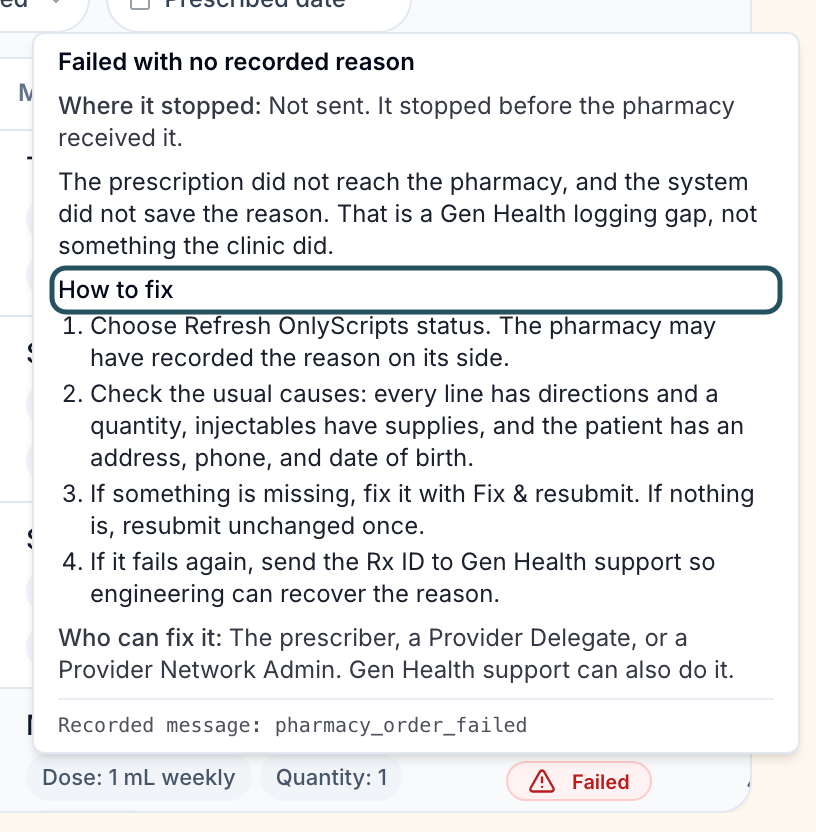
Use this when a status shows a warning triangle, or reads Failed, API Submission Failed or Pharmacy Order Failed.
Read the cause
Hover the triangle. The card names the problem, How to fix it and Who can fix it.
Fix patient details
Missing phone or address, or sex other than Male or Female: correct it on the patient's Profile tab.
Fix pharmacy payment
No payment method on the pharmacy account: a Client Admin clicks Update OnlyScripts payment method on Integrations.
Send it again
Open the prescription. If a Submission stuck card shows, click Retry submission. Otherwise ask your network to resubmit.
You'll know it worked when the status moves to Sending, then Sent to pharmacy.
Who can do this: Client Admin and Client Staff. Prescriber, license, DEA and clinical-statement causes are fixed by your provider network.
Request a prescription or refill
Use this to ask your provider network to prescribe for a patient you saw, or to renew a past prescription.
Start
Click Request prescription (top right).
Patient
Pick the patient, or a row under Or pick from recent orders.
Encounter
Choose Needs a visit, Visit outside the system, Refill request or Manual entry. For a refill, pick the old prescription under Choose a prescription; no new intake is asked.
Prescription
Complete medication, quantity, days supply and directions. Add any Clinical difference statement the pharmacy asks for.
Fulfillment
Choose Request payment from patient or Send directly to pharmacy, set Patient price, then click Request prescription.
You'll know it worked when the toast reads Prescription request received and is being prepared. The row shows Pending Approval until a provider approves it.
Who can do this: Client Admin and Client Staff. The button is greyed out, with the reason on hover, when no provider network is linked or the network has turned requests off.
Start a refill for a patient
Use this when a patient is due and you want them to refill now.
Open the prescription
Click the row.
Start it
In Refill actions, click Start refill. The same button is in Order Details on Orders.
You'll know it worked when the toast reads Refill started. The patient was notified to review and submit their forms. The refill is a new order on Orders.
Who can do this: Client Admin and Client Staff, on prescriptions that are not voided, cancelled, delivered or expired.
Change a patient's refill reminder
Use this when one patient needs a reminder at a different time from your product default.
Open the prescription
Find Patient messaging rules.
Add the rule
Refill preset adds an email 14 days before the last day of supply. For your own timing, click Add rule, set the timing, channels and message, then Save rule.
You'll know it worked when the card counts one more active rule.
Who can do this: Client Admin and Client Staff. The default for everyone is on the product's Refill reminders tab.
Void a prescription
Use this to stop a prescription the pharmacy has not dispatched.
Open the row menu
Click the row's actions menu → Void prescription.
Confirm
Fill Void reason, then click Void prescription.
You'll know it worked when the toast reads Prescription voided. Voiding does not refund; refund on Orders.
Who can do this: Client Admin and Client Staff, before the pharmacy ships. A request at Pending Approval cannot be voided; ask your network to cancel it.
Statuses you'll see here
| Status | What it means | Who acts next | What you do |
|---|---|---|---|
| Pending Approval | Your request waits for a provider | Provider network | Message them if it sits |
| Queued for review | Written; waits out the network's review window (2 hours by default), then sends itself | No one | Void it if it must not go |
| Awaiting patient payment | Goes out once the patient pays | Patient | Send a reminder from Orders |
| Saved | Stored, not sent | Provider network | Ask them to send it |
| Sent to pharmacy / Processing | The pharmacy has it | Pharmacy | Wait; a triangle means a problem |
| On Hold / Action Required / Need Clarification | The pharmacy needs an answer | Network or you | Hover the status; message your network |
| Failed / Payment Failed | It did not go through | You or network | Fix it |
| Shipped / Delivered | As reported by the pharmacy | Carrier | Share Tracking |
Patients don’t see most failures; their portal says Processing. More in Words and statuses.
What can go wrong
| What you see | Why | Fix |
|---|---|---|
| Order says Approved, nothing here or at the pharmacy | The provider approved but has not finished writing the prescription. | Message your network with the patient and order. |
| No payment method on the pharmacy account | OnlyScripts has no card to charge for the medication. | Client Admin: Integrations → Update OnlyScripts payment method, or Fix payment on the Dashboard alert. |
| Pharmacy does not dispense to this state | The paired pharmacy doesn't ship to the patient's state. | Pair another pharmacy on Formulary, then ask the network to resend. |
| Patient paid for 3 months but got one vial | Quantity comes from the provider's prescription. | Ask your network for a corrected prescription. |
| Request prescription won't submit | A required field is empty, often directions. | Open each step and complete the fields it flags. |
Questions people ask
What does "Queued for review" mean?
The prescription is written and waiting out your network's review window. When the countdown ends it goes to the pharmacy without anyone clicking anything.
Can a returning patient refill without doing the intake again?
Yes: Request prescription → Refill request. A provider still approves it; whether a visit is needed depends on your network's rules.
Related
Was this helpful?