
Settings — Developers
Create API keys, send webhooks to your server, read the Request Log, and tell sandbox mode from test mode. Links to the API docs for building integrations.
Developers is where your developer gets API keys, sets up webhooks and checks what your integration did. Left menu → Settings → Developers. Client Admin only.
What you can do here
- Create an API key
- Rename, regenerate or revoke a key
- Send events to your server (webhooks)
- Check what your integration did
- Test safely: sandbox mode vs test mode
- Give your developer the API docs
Create an API key
Use this when your developer, website, Zapier or CRM needs to talk to GEN Health.
Open API keys
Click the API keys tab, then Create key (top right).
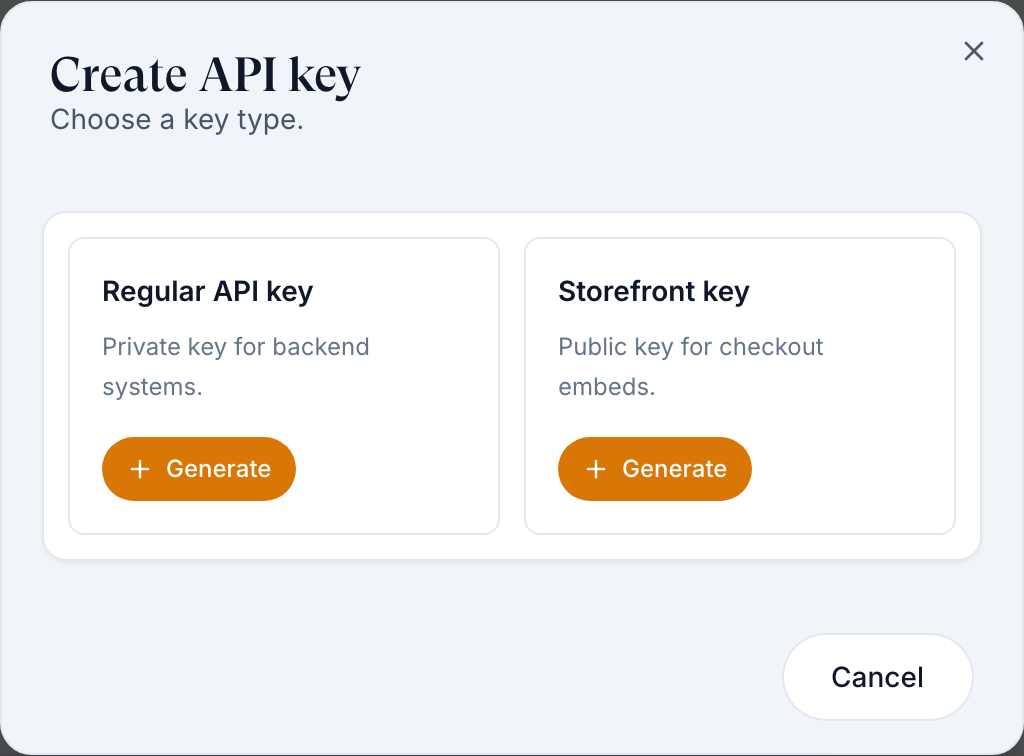
Pick the type
Regular API key is private, for your server. Storefront key is public, for checkout embedded in your website. Clicking a card creates the key straight away.
Copy it now
Copy your key now shows the full key once. Store it in your password manager or your developer's secrets, then click Done.
You'll know it worked when the toast reads API key generated and the key is listed as Active.
Who can do this: Client Admin.
Never put a regular API key in a web page, an email or a chat. If one leaks, Regenerate it.
Rename, regenerate or revoke a key
Use this when a key leaked, someone left, or you want a clearer name.
Open the row menu
Click ⋮ on the key: Rename, Regenerate (new value; the old one stops working) or Revoke (stops it for good).
Allow your websites
For a storefront key, Edit origins lists every website address allowed to embed checkout, such as https://www.yourbrand.com.
You'll know it worked when the toast reads API key regenerated, API key revoked or Allowed origins updated.
Who can do this: Client Admin.
Send events to your server (webhooks)
Use this when your server, CRM or Zapier should hear about new patients, payments, visits and prescriptions as they happen.
Add an endpoint
On the Webhooks tab, click Add endpoint. Fill Name and URL (HTTPS and reachable from the internet). Leave Enabled on.
Choose events
All events sends everything, including events added later. Selected events lets you tick groups such as orders or prescriptions.
Create it
Click Create endpoint, then copy the Signing secret; your developer uses it to check each delivery came from GEN Health.
Test it
Row menu ⋮ → Send ping. The Webhook simulator below the list sends a signed sample of any event.
You'll know it worked when the toast reads Ping delivered (HTTP 200).
Who can do this: Client Admin. Up to 10 endpoints.
Check what your integration did
Use this when your developer says a call failed or a webhook never arrived.
Open Request Log
It lists recent API calls, webhook deliveries and Hosted Checkout payment failures. Filter by Type and Status, then click a row to see the request and response.
See the trend
Analytics shows Requests, Success rate, Avg duration and webhooks delivered or failed, from the latest 200 log entries.
You'll know it worked when the failing call shows with its status code.
Who can do this: Client Admin.
Test safely: sandbox mode vs test mode
Use this before launch. The two names sound alike but are separate switches.
Test mode: no real charges
Your payment processor is None (Settings → Payments, tile Test mode — no real charges). Checkout says This checkout is in test mode. No live payment will be processed. and orders go through unpaid. It changes payment only.
Sandbox mode: nothing leaves GEN Health
Your provider network sets this for the whole account, and SANDBOX MODE shows in the left menu. Orders, forms and visits work, including orders created through the API, but prescriptions don't go to the pharmacy and lab orders don't go to the lab.
Go live
Cancel your test orders, then click SANDBOX MODE → Request go-live. Your provider network approves it.
You'll know it worked when the SANDBOX MODE badge is gone and a real processor tile is active.
Who can do this: Client Admin requests go-live; only your primary provider network or GEN Health turns sandbox mode on or off.
Give your developer the API docs
Use this when your developer asks how to create orders, build checkout or handle refills through the API.
Open Documentation
Click Documentation (top right). It opens in a new tab with V2 API, V2 Guide, V1 API, Webhooks, Hosted Checkout and Patient Migration. Send that link to your developer.
You'll know it worked when the docs open with your brand at the top.
Who can do this: Client Admin opens it; anyone with the link can read it.
What's on this page
| Control | What it does |
|---|---|
| Overview tiles | Setup at a glance. Storefront reads Needs setup until a storefront key exists. |
| Skip account setup | Patients created through the API skip account setup. Use it only if your API sends their onboarding details. |
| Use source custom field | Shows a patient custom field, such as source, in the Patients page Source column. |
Statuses you'll see here
| Status | What it means | Who acts next | What you do |
|---|---|---|---|
| Active (key) | The key works | No one | Nothing |
| Revoked / Legacy | Stopped, or an older key format | You | Create a new key and switch to it |
| Disabled (endpoint) | Switched off; gets nothing | You | Edit → Enabled |
| Auto-paused | 10 deliveries in a row failed | Your developer | Fix the server, then enable it again |
What can go wrong
| What you see | Why | Fix |
|---|---|---|
| Storefront is returning 0 products | Only active, priced products shown on the storefront are listed. | On Products (Config view), set a price and tick Storefront. |
| Webhook deliveries fail (404, DNS errors) | The URL isn't reachable or your server returned an error. | Read the status code in Request Log, fix the server, then Send ping. |
| API orders never reach the pharmacy | Your account is in sandbox mode. | Request go-live. |
| You lost a key | It is shown only once. | Regenerate it, or create a new key. |
| Questions about payloads, vault IDs or order flows | These are API questions, not settings. | Read the V2 Guide, then raise a GEN Health ticket (Technical issue / bug). |
Questions people ask
Should we use the V1 or V2 API?
V2. Build new work on the V2 API and V2 Guide tabs.
Is there a sandbox we can test in?
Ask your provider network to put your account in sandbox mode: nothing goes to pharmacies or labs. Set the processor to None as well if you don't want real charges.
How do we test a webhook like prescription.sent without a real prescription?
Use the Webhook simulator on Webhooks: pick the event and send a signed sample to your endpoint. Real events only fire when the real thing happens.
Where do I find a product's ID?
On Products, row menu ⋮ → Copy ID.
Related
Was this helpful?