
Forms
Your network's intake and consent forms: who owns which form, build a form with disqualifiers, attach it to protocols or categories, choose how long answers count, and make staff sign forms.

Forms holds your network's patient intakes and consents, which attach to protocols and apply to every client that sells them, plus forms your own staff and your clients' staff must sign. Left menu → Forms. Provider Network Admin; Providers and Provider Delegates can preview forms read-only.
What you can do here
- Know which forms are yours and which are the client's
- Build an intake or consent form
- Attach a form to protocols
- Choose how long answers count
- Make your staff or client staff sign a form
Know which forms are yours and which are the client's
Use this when a client asks who owns an intake, or wants one changed.
| Form | Who builds it | Who fills it in |
|---|---|---|
| Patient Intakes, Patient Consents | Your network, here | Patients of every client selling the protocol it's attached to |
| Provider Network Forms | Your network, here | Your providers and delegates |
| Client Forms | Your network, here | Client admins and staff at your clients |
| A client's own forms | The client, on its Forms page | Its patients, in addition to yours; the client can't remove your forms |
Editing a network form changes it for every client at once.
Build an intake or consent form
Use this for a new questionnaire or consent. The tab you're on decides the form type.
Start it
Open Patient Intakes or Patient Consents, click Add, then Create it on your own. Upload a PDF drafts one from a document; Duplicate in a row's menu copies one.
Name it
Click New Intake Form and type the name. Rename Section 1.
Add questions
Click Add Question, pick a QUESTION TYPE (for example Radio or Date), type the QUESTION LABEL, add options, and tick Required field. Click Add Question to place it.
Stop ineligible patients
Under DISQUALIFIERS, set the answer that blocks the patient. On a Date question, use Patient is younger than or Patient is older than.
Show questions to some patients only
Use Patient visibility (Age or Sex at birth), or attach a follow-up question to one answer.
Preview and publish
Click Preview, then Publish Form. Save Draft keeps it private.
You'll know it worked when the form shows Active in the list. A draft can't be attached to a protocol.
Who can do this: Provider Network Admin.
Attach a form to protocols
Use this so patients get the form when they buy a protocol. Every protocol needs an intake, or clients can't offer it.
Open the association
Click the form's Protocols cell (for example 2 protocols). Protocol & Category Association opens.
Pick what it covers
Choose Apply to All Patients, one or more Categories, or tick Individual Protocols. It saves in the background.
You'll know it worked when the cell shows the new count or All protocols. You can also attach forms from the protocol's Required forms.
Who can do this: Provider Network Admin.
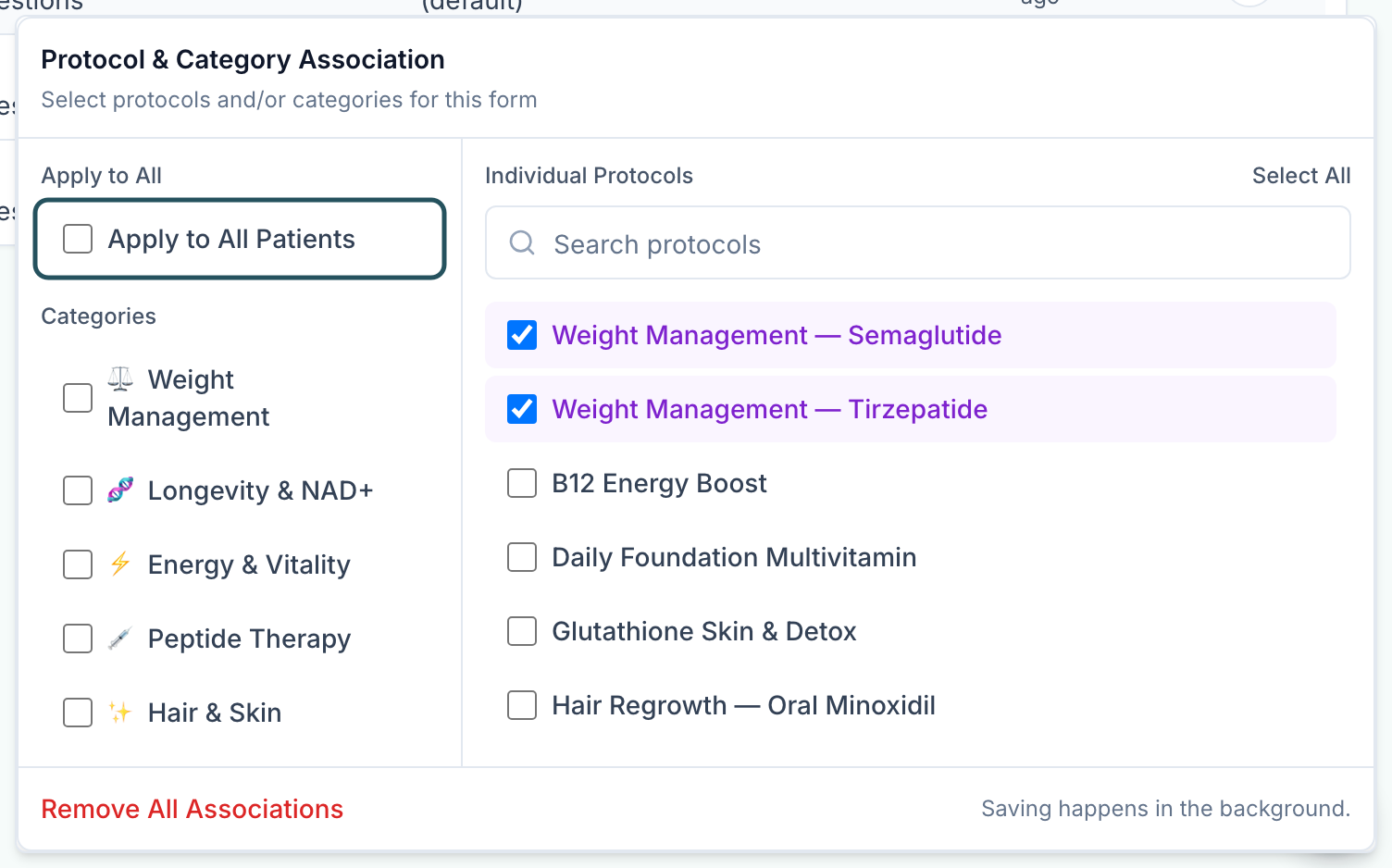
Consents: attach a telehealth consent with Apply to All Patients so everyone signs it once, and product consents to their protocols. Signed forms are on the patient's profile, Forms tab.
Choose how long answers count
Use this so returning patients aren't asked the same questions too often, or are always re-asked.
Open Answer Reuse
Click the form's Answer Reuse cell (30 days (default)).
Pick a rule
Require every time, Platform default (30 days), or type days under Valid for a custom window and click Apply.
You'll know it worked when the toast reads Answer reuse updated and the cell shows the rule. Consents read Current version: a signature holds until you publish a new version.
Who can do this: Provider Network Admin.
Make your staff or client staff sign a form
Use this for agreements your providers or clients' staff must sign.
Create it on the right tab
Open Provider Network Forms or Client Forms and click Create Provider Network Form or Create Client Form. Build and publish it.
Choose who signs
Click Click to assign in Audience and pick Providers, Provider Delegates, Client Admin or Client Staff.
You'll know it worked when the Audience cell names the role. Until then nobody is asked to sign.
Who can do this: Provider Network Admin.
What can go wrong
| What you see | Why | Fix |
|---|---|---|
| Intake forms needed banner | A client has an active protocol with no intake, so it's hidden from them and their patients | Attach an intake to each protocol listed. The banner clears itself. |
| A form isn't in the list | The status filter starts on Active | Add Draft or Inactive to the filter. |
| A patient filled the wrong intake for a product | The form is attached by category or Apply to All Patients | Narrow the form's Protocols association. |
| A refill order has no new intake | Refills skip the first intake by design | Add a Clinical rules refill rule with Require forms on the protocol, or request a form from the patient's profile. |
| A disqualified patient can't continue and doesn't know why | A disqualifier matched their answer | Check the rule under DISQUALIFIERS. Put what to do next in the question's Help Text (under ADDITIONAL OPTIONS). |
| Drafts named New Intake Form pile up | The builder saves a draft as soon as you edit a form, even if you close it | Filter to Draft and Delete the ones you don't need. |
| Form must have at least one question | You clicked Publish Form on an empty form | Add a question, or Save Draft. |
Questions people ask
If we update a network-level intake form, does it change for all our clients?
Yes. For one client only, the client adds its own form on its Forms page.
How can we copy an intake form from one clinic to another?
You don't need to. Turn the protocol on for the other client and your intake comes with it.
Can the age disqualifier be set on all intake forms?
Set it once per form, on a Date question with Patient is younger than. A short form with Apply to All Patients covers everyone.
Can forms hide female-only questions from male patients?
Yes: Patient visibility → Sex at birth on the question.
Can we delete a form patients already filled in?
Use Deactivate instead. Delete is permanent and breaks anything that points at the form.
Related
Was this helpful?