
Patients
Find any patient of your network's clients, read their record, fix the phone, address or sex a pharmacy rejected, leave Internal or Shared comments, and call them.

Patients lists every patient of the clients your network serves and opens their full record: profile, forms, visits, orders, prescriptions, labs and chat. Left menu → Patients. Provider Network Admin, Provider and Provider Delegate.
What you can do here
- Find a patient
- Read a patient's record
- Fix a patient's phone, address or sex
- Leave a note for your team or the client
- Call a patient
Find a patient
Use this when a client, a pharmacy or a colleague names a patient and you need their chart.
Search
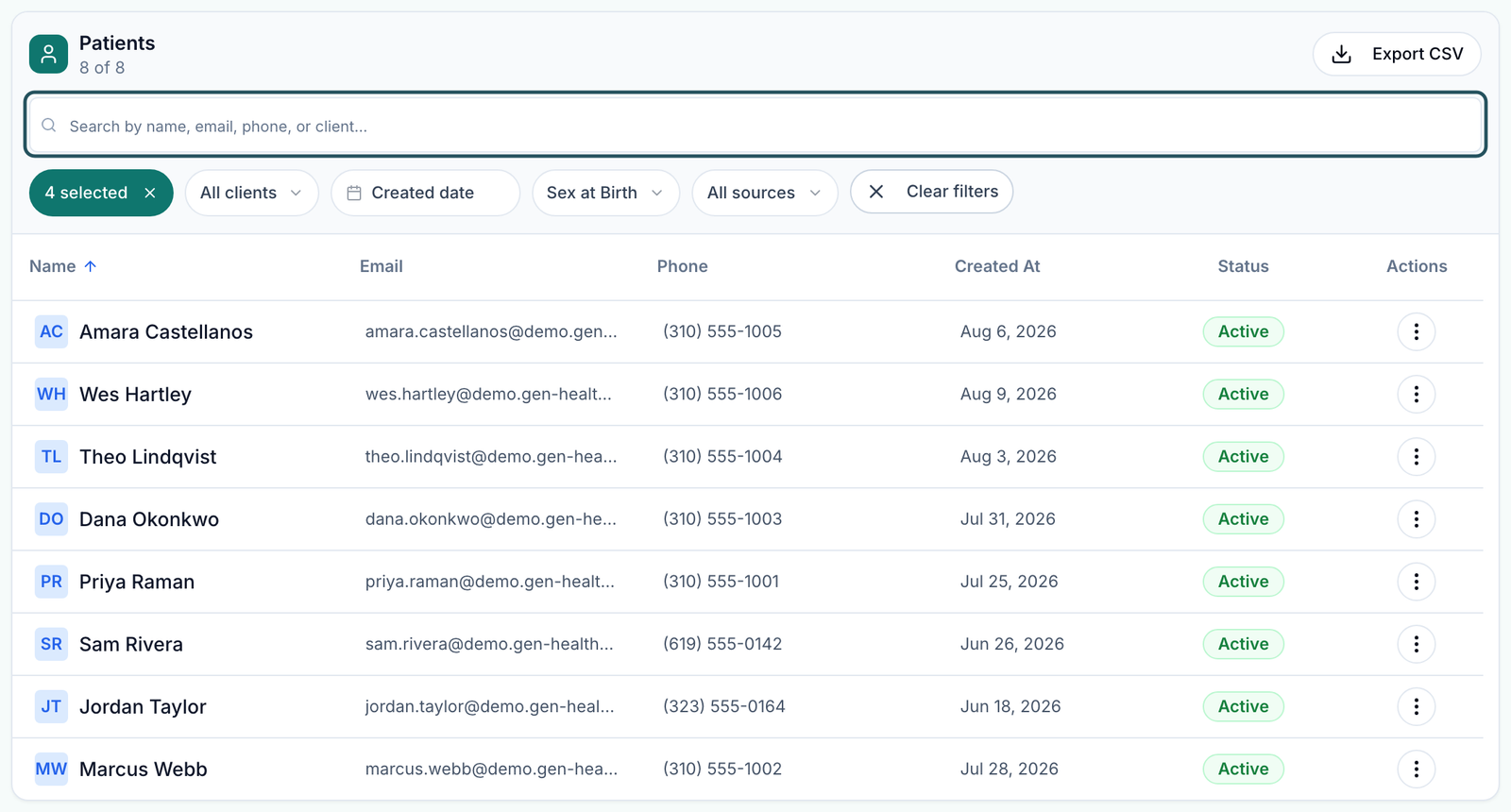
Type in the search box at the top of the table. Admins and delegates can search by name, email, phone or client; Providers use Search patients. Search the full email: names repeat.
Widen the filters if nothing shows
The status filter starts on every status except Archived (it reads 4 selected). Click Clear filters to reset it, Created date, Sex at Birth and All sources.
Narrow by client or state
Admins and delegates use All clients. Providers get Patient state, plus All clients once your network serves more than one client.
You'll know it worked when the patient's row shows with their email and status.
Who can do this: Provider Network Admin, Provider and Provider Delegate. You see patients of active clients linked to your network only.
Read a patient's record
Use this to see a patient's history before you act on a visit, order or script.
Open it
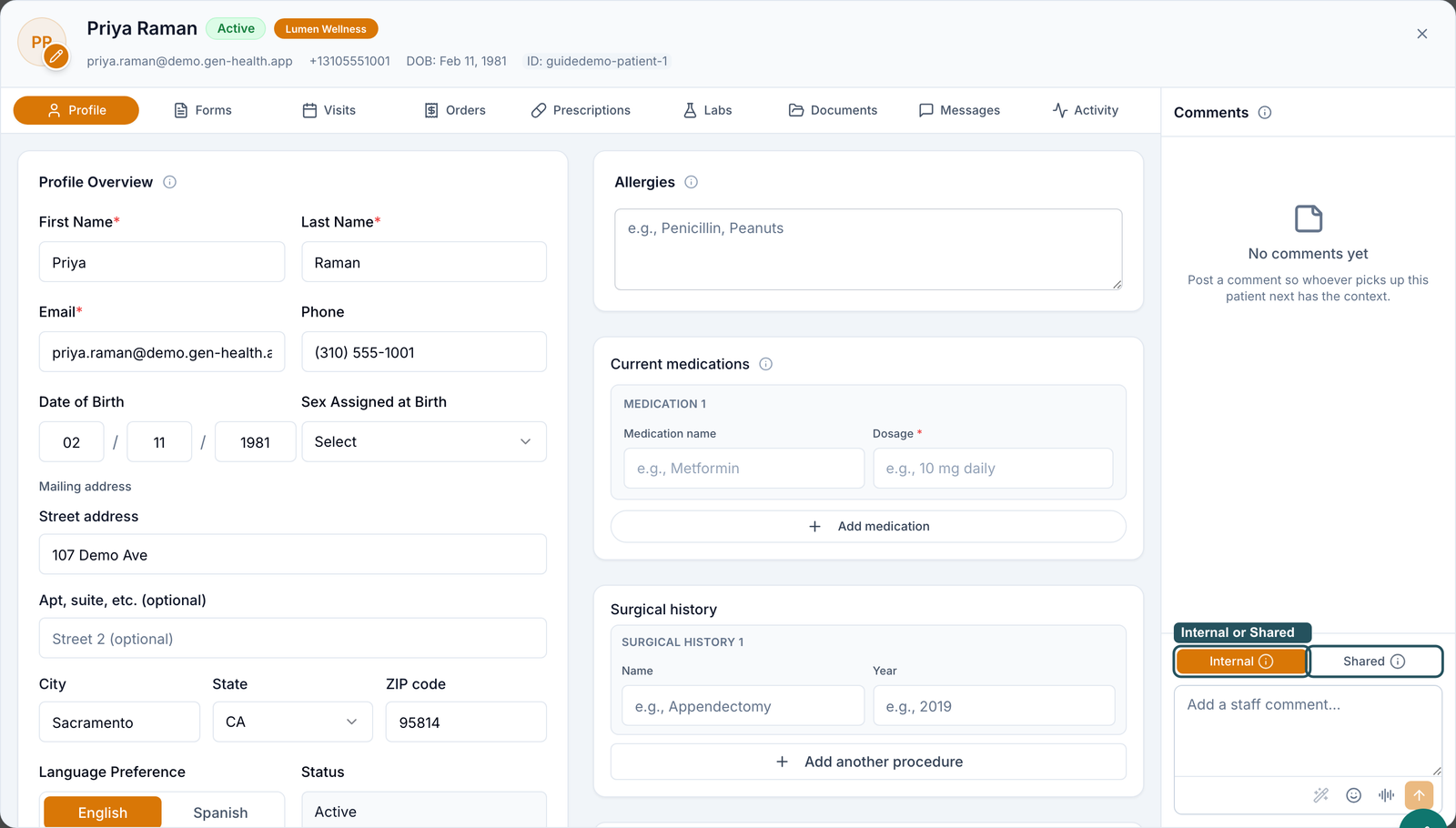
Click the patient's row. The record opens on Profile.
Move between tabs
Use the tabs along the top of the record (table below). Close dialog (the X) takes you back with your search intact.
| Tab | What you find |
|---|---|
| Profile | Contact details, address, sex, allergies, medications, history and weight journey. |
| Forms | Submitted intake and consent forms, and forms still outstanding. |
| Visits | Every async and sync visit, with its provider and status. |
| Orders, Prescriptions | What the patient bought, and every script with its pharmacy status. |
| Labs, Documents | Lab orders and results; uploaded files. |
| Messages | The patient's chat, when your network's messaging policy allows it. |
| Activity | What happened on the account, and when. |
You'll know it worked when the record shows the patient's name, client badge and status in its header.
Who can do this: all three roles.
Fix a patient's phone, address or sex
Use this when a pharmacy rejected a script for Patient details missing or Shipping address incomplete, or the patient moved state.
Open Profile Overview
In the record, stay on Profile.
Correct the field
Edit Phone, the Mailing address fields or Sex Assigned at Birth. Pharmacies accept only Male or Female, so confirm with the patient. Fields save when you leave them.
Resend the script
Go to Prescriptions and use Fix & resubmit. Fixing the record resends nothing.
You'll know it worked when the new value is still there after you close and reopen the record.
Who can do this: Provider and Provider Network Admin, for patients of clients linked to your network, and the client's own staff. Provider Delegates see the profile read-only.
Leave a note for your team or the client
Use this to leave context for whoever picks up this patient next.
Find Comments
Comments runs down the right side of the record, on every tab.
Choose who can read it
Internal (the default) is for Provider Network users only. Shared is also shown to the client's staff.
Post it
Type in Add a staff comment… and click Post comment (the arrow).
You'll know it worked when the comment appears in the list with an Internal or Shared badge.
Who can do this: Provider Network Admin, Provider and Provider Delegate.
Call a patient
Use this to phone a patient from your browser.
Click the phone button
It sits in the record header (Call and the patient's name on hover).
Start the call
In Call patient, click Start call and allow microphone access.
You'll know it worked when the call bar opens and the patient's phone rings.
Who can do this: all three roles, when the patient has a phone number and their client has an active messaging phone number. Without both, there is no phone button.
Provider Delegates: your status filter shows only Active and Archived, and the row menu adds Send Magic Link and Copy Magic Link to help a patient sign in.
Statuses you'll see here
| Status | What it means | Who acts next | What you do |
|---|---|---|---|
| Active | Set up, nothing blocking care. | — | Nothing. |
| Account Setup Required | The patient hasn't finished signing up. | Patient, client | The client nudges the patient. |
| Forms Required | Required intake or consent forms are unfinished. | Patient | Check Forms for what is outstanding. |
| Sync Visit Required | A live video visit is needed before care continues. | Patient, client | The patient books; check Visits. |
| Archived | The client archived or deactivated the account. | Client | Nothing. |
What can go wrong
| What you see | Why | Fix |
|---|---|---|
| A patient on the client's list isn't here | A filter is on, the patient is archived, or they belong to a client not linked to your network. | Clear filters, search the email, then ask the client which account they used. |
| Searching the name finds nothing | The name on the account differs. | Search the email or phone. |
| The same person appears twice | Two accounts, often under two clients or with a mistyped email. | Compare the email and client; ask GEN Health support to merge them. |
| No option to send a sign-in link or add a patient | Magic links are for Provider Delegates and client staff; patients are created by the client. | Ask the client's staff. |
| No Messages tab in the record | Your network's messaging policy blocks it for that client. | A Provider Network Admin checks Settings → Messaging. |
Questions people ask
Can a network admin open a patient's chart?
Yes. Provider Network Admins have Patients in the left menu and can read every tab and edit the profile.
The patient is in California but their ID says another state. Can we change it?
Yes: Profile → Mailing address → State. The state decides which providers can claim their visits and which pharmacies can ship.
Can I see the patient's chat from their chart?
Yes, on the record's Messages tab.
Can the client read my comments?
Only the ones you post as Shared. Internal comments stay in your network.
Can I add a patient?
No. Patients sign up through the client's storefront or API, or the client adds them.
Related
Was this helpful?