
Protocols
Your clinical catalog: create a protocol, require labs with minimum biomarkers and result recency, manage network categories, turn a protocol on for a client (and why patients still can't see it), and retire one with Replace and delete.

Protocols is your network's clinical catalog: what each treatment requires (forms, labs, a video visit, a DEA prescriber) and which clients may sell it. Left menu → Protocols. Provider Network Admin; Providers and Provider Delegates can browse it read-only.
What you can do here
- Create or edit a protocol
- Require labs for a protocol
- Organise protocols into categories
- Turn a protocol on for a client, and why patients still can't see it
- Retire a protocol and move clients to its replacement
Create or edit a protocol
Use this to add a treatment, or change what an existing one requires.
Start it
Click Create (top right), then Protocol. To edit, use the row menu … → Edit product. Or start from a ready-made one with Templates → Add.
Fill the Basics tab
Type the Name, leave Status on Active when it's ready, and tick its Categories. Product Notes & Clinical Disclaimer is shown to prescribing providers, never to patients.
Attach the forms
Under Required forms, tick the intake and consent forms patients complete before checkout. Only published forms are listed.
Set the requirements
Turn on Require telehealth visit for a live video visit, Requires labs (see below) or Requires DEA-licensed provider for controlled medications. Pick any Unavailable states.
Add refill rules if refills differ
On Clinical rules, click Add rule to require a visit or new forms for later purchases, for example after day 90. With no rules, refills work like today.
Save
Click Create protocol (or Save changes when editing).
You'll know it worked when the toast reads Protocol created and the row appears. Sync visit?, Labs? and Forms show your choices.
Who can do this: Provider Network Admin.
Require labs for a protocol
Use this when patients need recent results before a provider can prescribe.
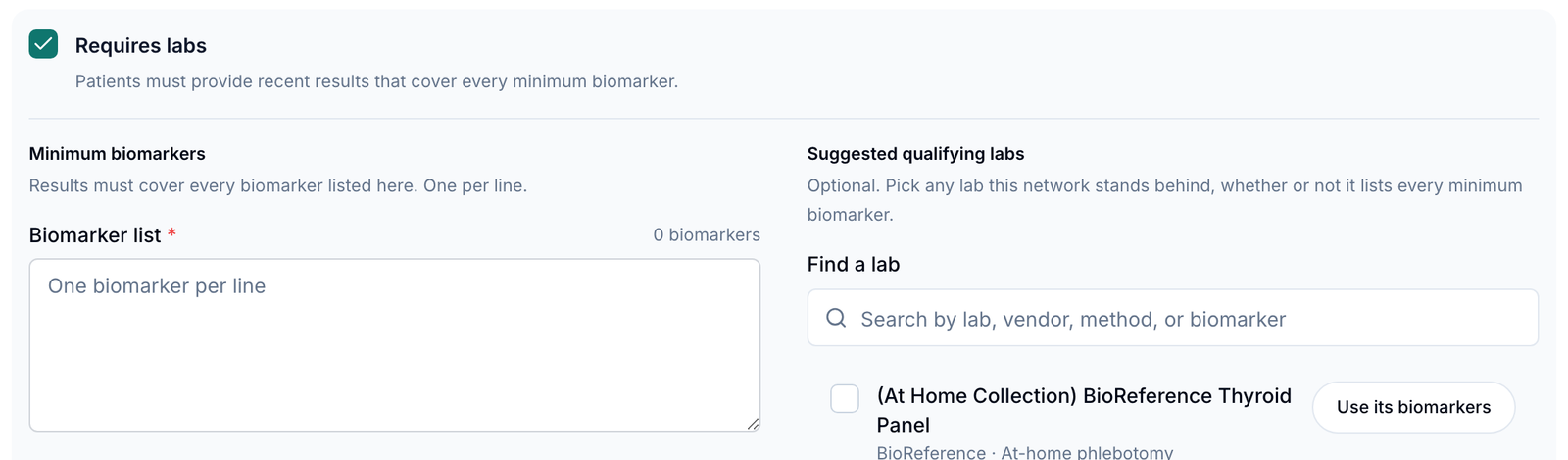
Turn on Requires labs
In the protocol, switch on Requires labs. Or click the row's Labs? cell → Edit protocol.
List the Minimum biomarkers
Type one per line in Biomarker list, or use Add from a source to copy them from a lab panel, pasted text, a document or another protocol. Results must cover every marker listed.
Suggest labs (optional)
Under Suggested qualifying labs, pick panels you stand behind. Use its biomarkers copies a panel's markers into your list.
Set Result recency
Enter Recency window in days, or click 30 days, 60 days, 90 days or 180 days. Older results don't count.
You'll know it worked when the row's Labs? cell reads Required and its popover lists your biomarkers.
Who can do this: Provider Network Admin. You can also link a panel from Labs → Link protocol.
Organise protocols into categories
Use this to group protocols so forms, filters and clients' menus stay tidy.
Open Network categories
Click Categories at the top.
Add or change one
Click Add category, or Edit / Archive on a row. Import loads a list.
You'll know it worked when the toast reads Category created and it appears under Categories in the protocol form.
Who can do this: Provider Network Admin. A form attached to a category applies to every protocol in it.
Turn a protocol on for a client, and why patients still can't see it
Use this when a client should start selling a protocol.
Tick the client
Click the row's Clients cell (for example 1 client) and tick the client. For several protocols, use Presets or the client's Available protocols.
Pair its medications
Click the row's Formulary cell (0 mapped) and switch on the medications this protocol uses. See Formulary.
Ask the client to publish it
It arrives switched off, hidden and without a price. The client activates it, turns on Show on storefront and sets a price.
You'll know it worked when the toast reads Protocol enabled for client and patients can buy it once the client has published it.
Who can do this: Provider Network Admin. Still invisible? Check that it's Active, has an intake form attached, and isn't in the patient's Unavailable states. A labs protocol also needs a lab the client offers.
Retire a protocol and move clients to its replacement
Use this when clients sell a protocol you're consolidating into another.
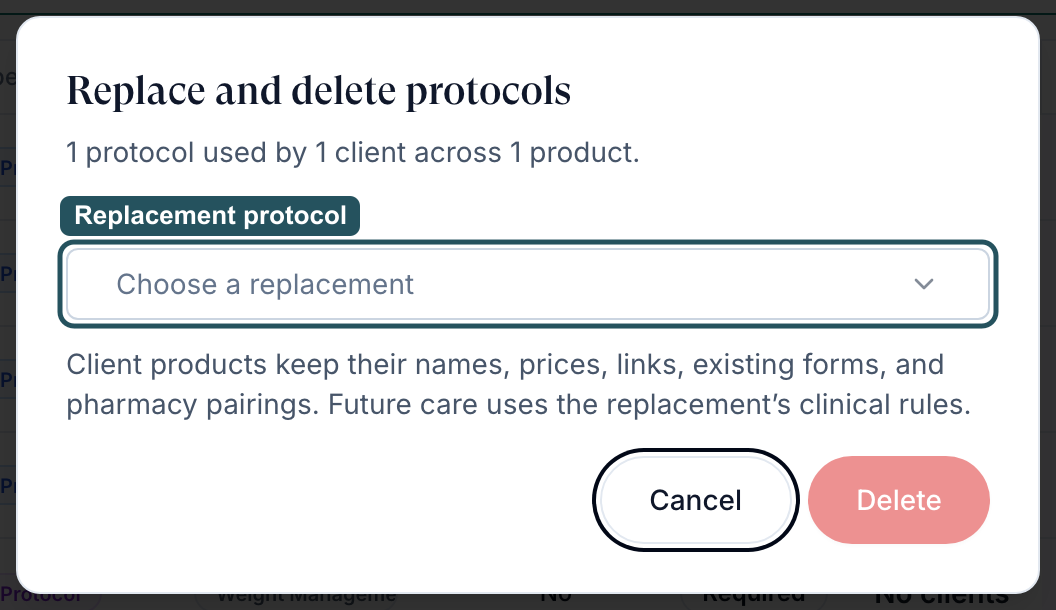
Start the delete
Row menu … → Delete protocol, or tick several rows and click Delete in the bar.
Read the impact
Replace and delete protocols shows how many clients and products use it.
Pick the replacement
Choose one under Replacement protocol. Read any Changes to review.
Confirm
Click Replace and delete and keep the dialog open until it finishes.
You'll know it worked when the toast reads Protocols replaced; client products preserved. Clients keep their names, prices, links and pairings; future care follows the replacement's rules.
Who can do this: Provider Network Admin. A protocol no client uses shows Delete protocols and is simply deleted.
What can go wrong
| What you see | Why | Fix |
|---|---|---|
| A form is missing from Required forms | It's a draft, or a staff form | Publish it on Forms under Patient Intakes or Patient Consents. |
| You can't remove an intake from one protocol; it keeps coming back | The form is attached to the protocol's category | Change the protocol's Categories, or the form's association in Forms. |
| New orders arrive with no intake form | Someone unlinked the forms from the protocol | Reattach them in Required forms or the row's Forms cell. |
| TRT patients arrive as async visits | Require telehealth visit is off | Turn it on. |
| Visits on a protocol are never claimed | Requires DEA-licensed provider is on and few providers have a DEA | Add DEAs in Providers, or turn it off for non-controlled medications. |
| No eligible protocols. Create or activate a replacement first. | No other active protocol to move clients to | Create or activate the replacement, then retry. |
Questions people ask
How does the network make protocols available to a client?
Tick the client in the protocol's Clients cell, apply a Preset, or use the client's Available protocols. The client then publishes and prices it.
Where do we edit the protocol to select approved lab panels or biomarkers?
Row menu … → Edit product → Requires labs: Minimum biomarkers, Suggested qualifying labs and Result recency.
Should protocols and forms be built per category or per medication?
Your choice. Every protocol needs an intake form; one form on a category covers every protocol in it.
Where do we add message templates providers can send with a prescription?
Message Templates at the top of this page. Providers can't add them here.
Are there ready-made protocols we can start from?
Yes. Templates lists reusable protocols; click Add to copy one into your catalog, then edit it.
Related
Was this helpful?