
Orders
Every purchase across your network's clients: find an order, see what is holding it up, chase tracking, correct a status or put it on hold, and refund as an admin.

Orders shows every purchase by patients of the clients your network serves, so you can see what is holding an order up and send it to the right place. Left menu → Orders. Provider Network Admin, Provider and Provider Delegate.
What you can do here
- Find an order
- Find out what is holding an order up
- Check shipping and tracking
- Correct a status or put an order on hold
- Refund an order (admins)
Find an order
Use this when a client or patient asks about a purchase.
Search
Type an order ID, patient, product or client in Search orders by ID, patient, product, or client….
Filter
Narrow with All types (Product, Package, Lab, Visit), All clients, All statuses, Tracking or Order date. Clear all resets them.
Check the row
Confirm the patient, client, product and amount before you act.
You'll know it worked when the count above the table reads 1 of N and the order is on screen.
Who can do this: all three roles, for every client linked to your network.
Find out what is holding an order up
Use this when someone asks "why hasn't this patient got their medication?".
Open Order Details
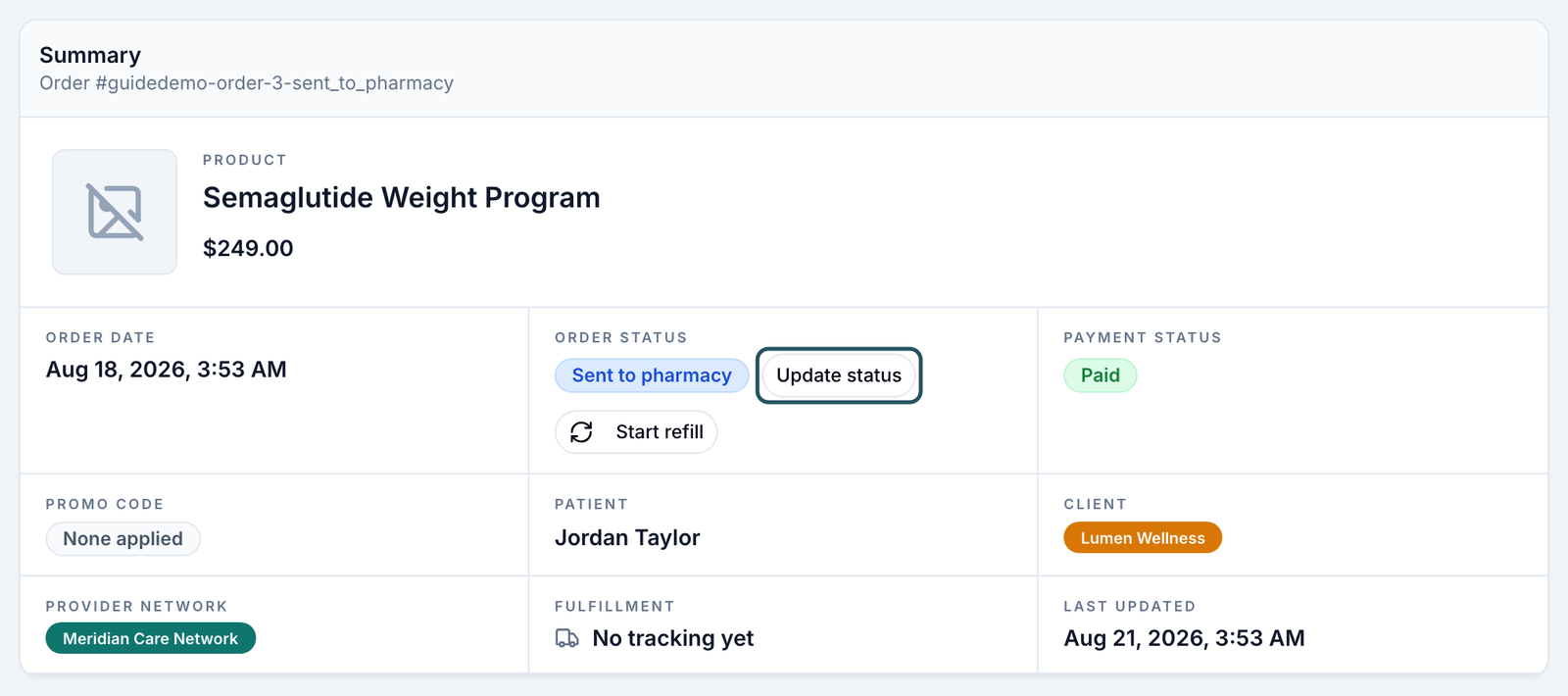
Click the row. The Summary shows Order status, Payment status and Fulfillment. Order and payment status are separate and can disagree.
Read the History
Scroll to History for every step so far: payment, forms, review, pharmacy, emails and texts sent.
Go where it's fixed
Use the status table below. Almost nothing is fixed on this page.
You'll know it worked when you can name who acts next: the patient, the client, a provider, the pharmacy or GEN Health.
Who can do this: all three roles.
Check shipping and tracking
Use this when an order was sent to the pharmacy and the patient asks where it is.
Find orders without tracking
Tracking → Missing tracking or Not shipped.
Refresh from the pharmacy
In Order Details, click Refresh Rx (shown when the script went through OnlyScripts). The Fulfillment field and the prescription's Tracking # update.
Still stuck? Ask the pharmacy
Support → Create Support Ticket → OnlyScripts, then pick the patient and the order.
You'll know it worked when a carrier and tracking number appear. A day or two at Received is normal while the pharmacy fills it.
Who can do this: all three roles.
Correct a status or put an order on hold
Use this when the status no longer matches reality, or an order must pause.
Open the status menu
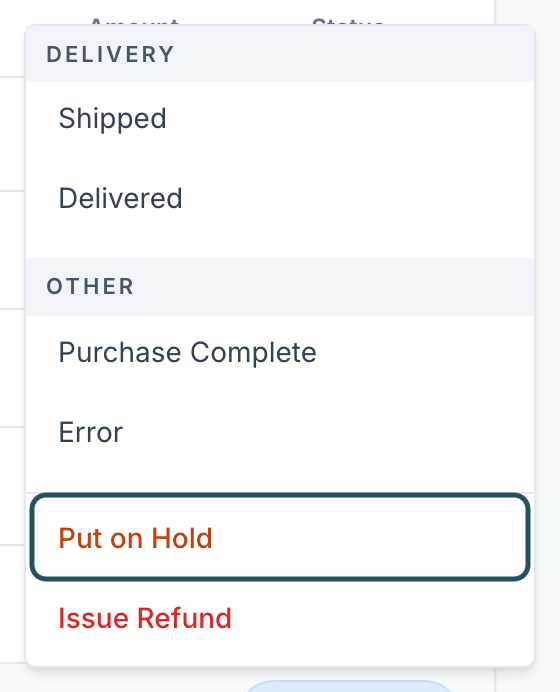
Click the status pill in the table, or Update status in Order Details. Statuses are grouped Payment, Review, Prescription, Delivery and Other.
Pick the correct status
Click it. It applies at once, with no confirmation, and is logged.
Or pause it
Click Put on Hold, add an optional Reason, then Put on hold. Nothing advances while it is held: no payment, no script to the pharmacy, no lab. To lift it, click the On hold pill → Release hold.
You'll know it worked when the toast reads Order status updated or Order placed on hold.
Who can do this: all three roles. Shipped, delivered, cancelled or refunded orders can't be held, and a hold can't recall a script the pharmacy already has.
A status is a label. Setting Sent to Pharmacy sends nothing, and Approved is not a clinical decision: those happen in the chart and on Prescriptions.
Refund an order (admins)
Use this only after agreeing it with the client, who usually holds the payment relationship.
Open Issue Refund
Click the status pill → Issue Refund.
Enter the amount and reason
Fill Refund Amount ($) (a partial amount is allowed) and the reason, then confirm.
You'll know it worked when the status reads Refunded or Partially Refunded.
Who can do this: Provider Network Admins, on paid orders. The money returns through the processor that took it.
Statuses you'll see here
| Status | What it means | Who acts next | What you do |
|---|---|---|---|
| Pending Payment | Not paid. | Patient, client | The client sends a reminder. |
| Pending Forms | Paid; intake or consent unfinished. | Patient | The client nudges the patient. |
| Awaiting Lab Review | A lab order held for the client's review. | Client Admin | They release or cancel it. |
| Pending Review, Under Review | Waiting for, or with, a provider. | Provider | Check Visits (ASYNC). |
| Deferred | The provider needs more information or a live visit. | Patient | The patient answers or books. |
| Approved | The provider approved; the script may not be sent yet. | Provider | Check Prescriptions. |
| Pharmacy Order Failed | The pharmacy refused or never got it. | Your network | Fix it on Prescriptions. |
| Sent to Pharmacy, Processing, Shipped, Delivered | With the pharmacy or carrier. | Pharmacy | Track; ask OnlyScripts if it stalls. |
| Denied | Declined. Nothing is refunded automatically. | Client | The client refunds if they choose. |
| Purchase Complete | Paid and done. | — | Nothing. |
What can go wrong
| What you see | Why | Fix |
|---|---|---|
| A client's orders are missing, or the list is empty | A filter is on, or the client isn't linked to your network. | Click Clear all; check the client on Clients. |
| The patient paid but the order says Pending Payment | Order and payment status disagree. | Trust Payment status in Order Details. Only the client can mark an off-platform payment as paid. |
| Approved for days and nothing at the pharmacy | No script was written or sent yet. | Check Prescriptions for the patient; the provider writes or sends it. |
| A status change is refused | The order is on hold or in Awaiting Lab Review. | Release the hold, or ask the Client Admin to release the lab order. |
| A Provider or delegate clicks Issue Refund and it fails | Only Provider Network Admins and the client can refund (You do not have permission to issue refunds). | Ask your admin or the client. |
| Shipped for days, or tracking stuck | Updates come from the pharmacy. | Refresh Rx, then an OnlyScripts ticket. |
Questions people ask
Can the client cancel an order that's already Sent to Pharmacy?
Clients can cancel from their Orders page until it ships. Once the pharmacy is filling it, ask OnlyScripts through Support to stop it.
If a patient pays and is then disqualified, is the refund automatic?
No. Refunds are always manual, from the client's Orders page or by a Provider Network Admin here.
Why was the patient refunded when we cancelled their visit?
Cancelling a sync visit refunds it automatically.
Why does one patient have several orders?
A product, a lab and a visit are separate orders even from one checkout, and a refill is a new order. Check Type and each order's History.
Did this $0 patient pay?
Check Payment status. A $0 order is normal when the client collects payment itself, for example in person.
Related
Was this helpful?