
Settings — Messaging
Decide which conversations your linked clients can start with your team, make patient texts secure, set rules per client, and add reusable message templates.
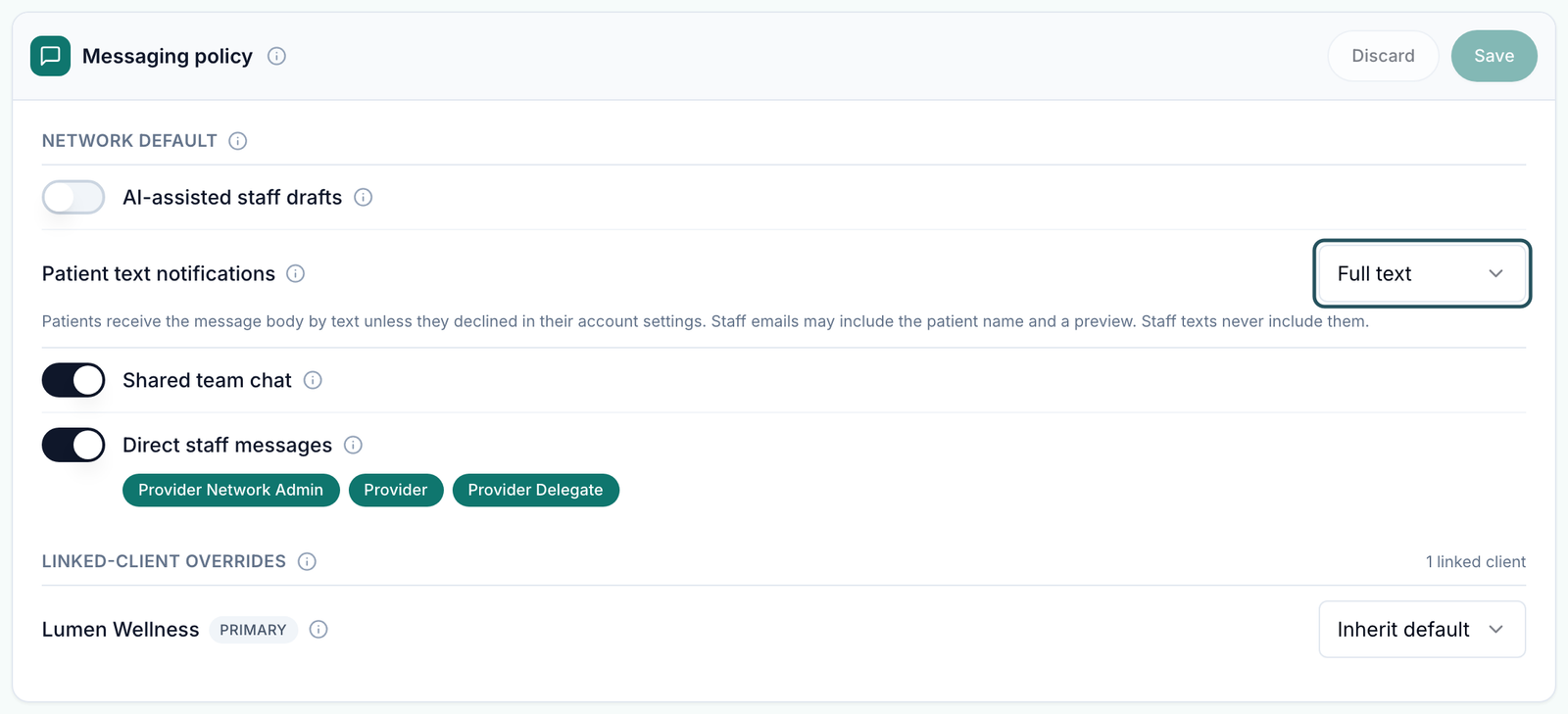
Settings — Messaging decides which conversations your linked clients can start with your team, how patient texts read, and holds the reusable messages your team inserts into chats. Left menu → Settings → Messaging. Provider Network Admin only.
What you can do here
Set the messaging rules for every client
Use this at setup, or when you change how clients reach your team. Clients get no notice of a change, so tell them first.
Choose how patient texts read
Under Network default, set Patient text notifications. Full text texts the message itself. Secure only says a message is waiting; the content stays in the app.
Choose what clients can start
Shared team chat gives each client one shared thread with your network. Direct staff messages lets client staff message individuals on your team.
Pick who they can reach
With Direct staff messages on, tick at least one of Provider Network Admin, Provider, Provider Delegate.
Decide on AI drafts
AI-assisted staff drafts lets your team ask for a suggested reply. Drafts are never sent automatically.
Save
Click Save in the Messaging policy header. Discard throws away unsaved changes.
You'll know it worked when the toast reads Messaging policy updated.
Who can do this: Provider Network Admin.
Set different rules for one client
Use this when one client needs direct messaging and the rest don't, or the other way round.
Find the client
Under Linked-client overrides, find the client. Its pill reads Primary or Additional.
Switch to a custom policy
Change its policy mode from Inherit default to Custom policy. Its own Shared team chat and Direct staff messages switches appear.
Set them and save
Change the switches, then click Save in the card header.
You'll know it worked when the toast reads Messaging policy updated and the row stays on Custom policy after a reload.
Who can do this: Provider Network Admin, for Primary links only. Additional links follow the client's primary network.
Add a message template
Use this for replies your team sends again and again, such as Prescription sent.
Pick the library
Below the policy, choose Patient messages (text for patients) or Escalation notes (internal wording).
Start one
Click New patient message (or New escalation note).
Write it
Fill Template name and the message. Variables such as {{patient_first_name}} fill in the patient's details; Using variables lists them.
Target it (optional)
Suggest for protocol categories (optional) and Suggest for formulary medications (optional) decide when it is suggested. Leave both empty for Any protocol.
Save
Click Create patient message (or Create escalation note). Back to templates leaves without saving.
You'll know it worked when the toast reads Template created and the template is in the list.
Who can do this: Provider Network Admin. Row actions Edit and Archive change or retire it.
What can go wrong
| What you see | Why | Fix |
|---|---|---|
| Save won't save and a red line reads Pick at least one role. | Direct staff messages is on with no role ticked | Tick a role, or turn the switch off. |
| A client says they suddenly can't message your team, or sees Network chat is disabled by your provider network. | Shared team chat or Direct staff messages was turned off. Old messages stay readable; new ones are blocked | Turn it back on, or give that client a Custom policy. |
| A patient got the full message by text though the default is Secure | The sender unlocked full text for that one message with the lock beside Send | Ask your team to leave the lock closed for messages with health details. |
| Staff don't see AI drafts after you turned them on | The linked client must consent too | Ask the Client Admin to turn it on on their side. |
| A provider sees every patient conversation, not just their own | The inbox is network-wide by design | For one client, turn on Patients can message providers directly on that client's profile. |
Questions people ask
Can we stop texts from carrying patient details?
Yes. Set Patient text notifications to Secure. Prescription messages, attachments and visit-charting messages are always secure.
Why is the policy mode greyed out for one client?
That client's pill reads Additional. Its primary network controls patient messaging.
Can I stop a client messaging patients here?
No. This page covers staff conversations between clients and your team. Patient messaging is set on the client's profile.
Related
Was this helpful?