
Charting window
Chart a visit from claim to decision: attestations, what each decision does and what the patient sees, Need Clarification for labs or forms, deferring, and sending the script with Submit Rx or Save for later.

The charting window is where you review, document, decide and prescribe for one visit, async or sync. It opens over the page you're on when you claim, start or open a visit. Provider; Provider Delegates can view charts and prescribe on approved ones.
What you can do here
- Claim and chart a visit
- Record your decision (approve, deny, escalate)
- Ask the patient for more information or labs
- Defer a visit
- Write and send the prescription (script)
- Save and leave a chart
Claim and chart a visit
Use this to take a visit from To Do to a decision.
Claim it
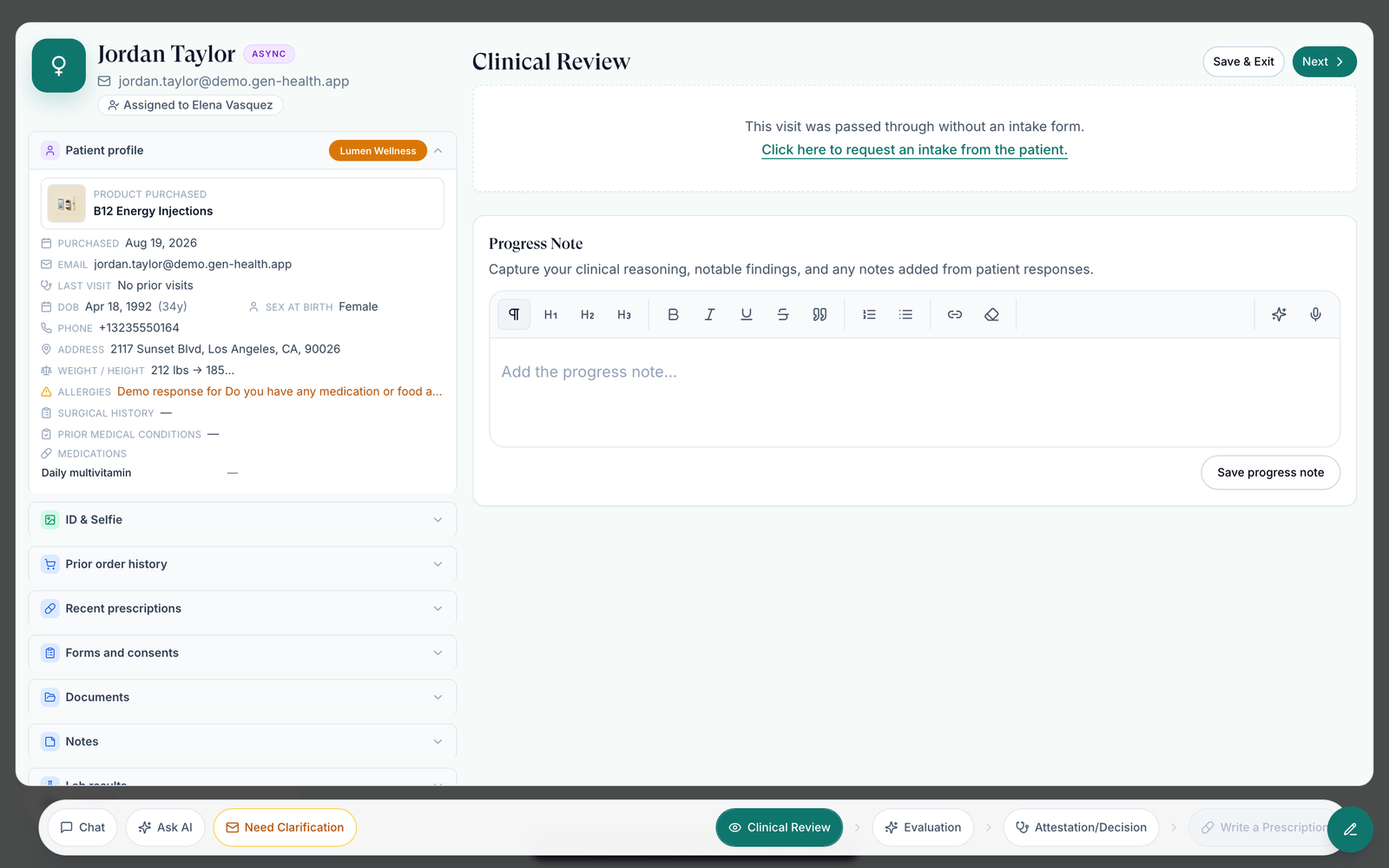
On ASYNC Visits → To Do, click Claim. The chart opens on Clinical Review.
Read the chart
The left column holds the profile, Prior order history, Recent prescriptions, Forms and consents, Documents, Notes and Lab results. Click the patient's name for their full record.
Write your progress note
Click an intake answer to note it, or type in Progress Note and click Save progress note.
Check the SOAP note
Click Next. Evaluation drafts the SOAP note with AI when it's empty. Edit it; Regenerate section replaces a section. If Ask AI edits the note, tick your attestations again.
Attest and decide
Click Next to Attestation/Decision, tick the attestations and choose an outcome.
You'll know it worked when Review claimed appears, and after Approve, Visit approved and the window moves to Write a Prescription.
Who can do this: the Provider who owns the visit.
Record your decision
Use this to finish a review. For an async visit, the decision completes it.
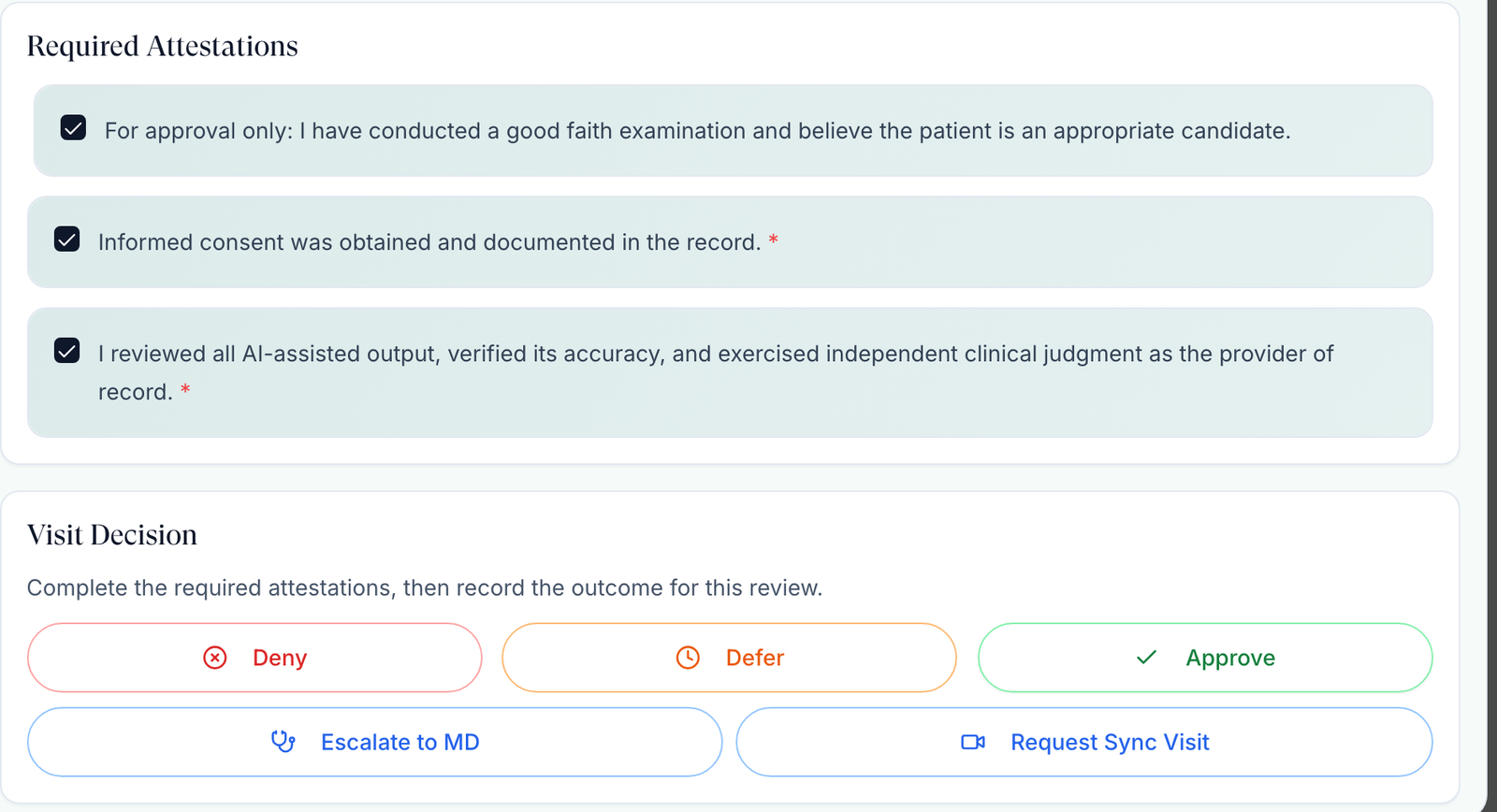
Tick the attestations
Informed consent and AI review unlock Deny, Defer, Escalate to MD and Request Sync Visit. Approve also needs the good faith examination box.
Choose the outcome
Deny asks for a Denial reason and for you to type DENY.
| Button | What happens | What the patient gets |
|---|---|---|
| Approve | Visit completes; you move to Write a Prescription | Their order moves on to prescribing |
| Deny | Visit completes as Denied | The reason goes in the order history; write it professionally |
| Defer | Visit completes as Deferred | Your patient-safe explanation |
| Escalate to MD | The visit moves, still open, to an MD you pick, with your note | Nothing |
| Request Sync Visit | The visit becomes a video visit to book | An email to book, with no second charge |
You'll know it worked when a toast confirms it, such as Visit approved or Intake denied.
Who can do this: the Provider who owns the visit. Once a script has been sent on the chart, Deny and Defer are unavailable.
Your network may combine the attestations, add required questions, or make it Approve and Prescribe in one click.
Ask the patient for more information or labs
Use this when you can't decide yet.
Open Need Clarification
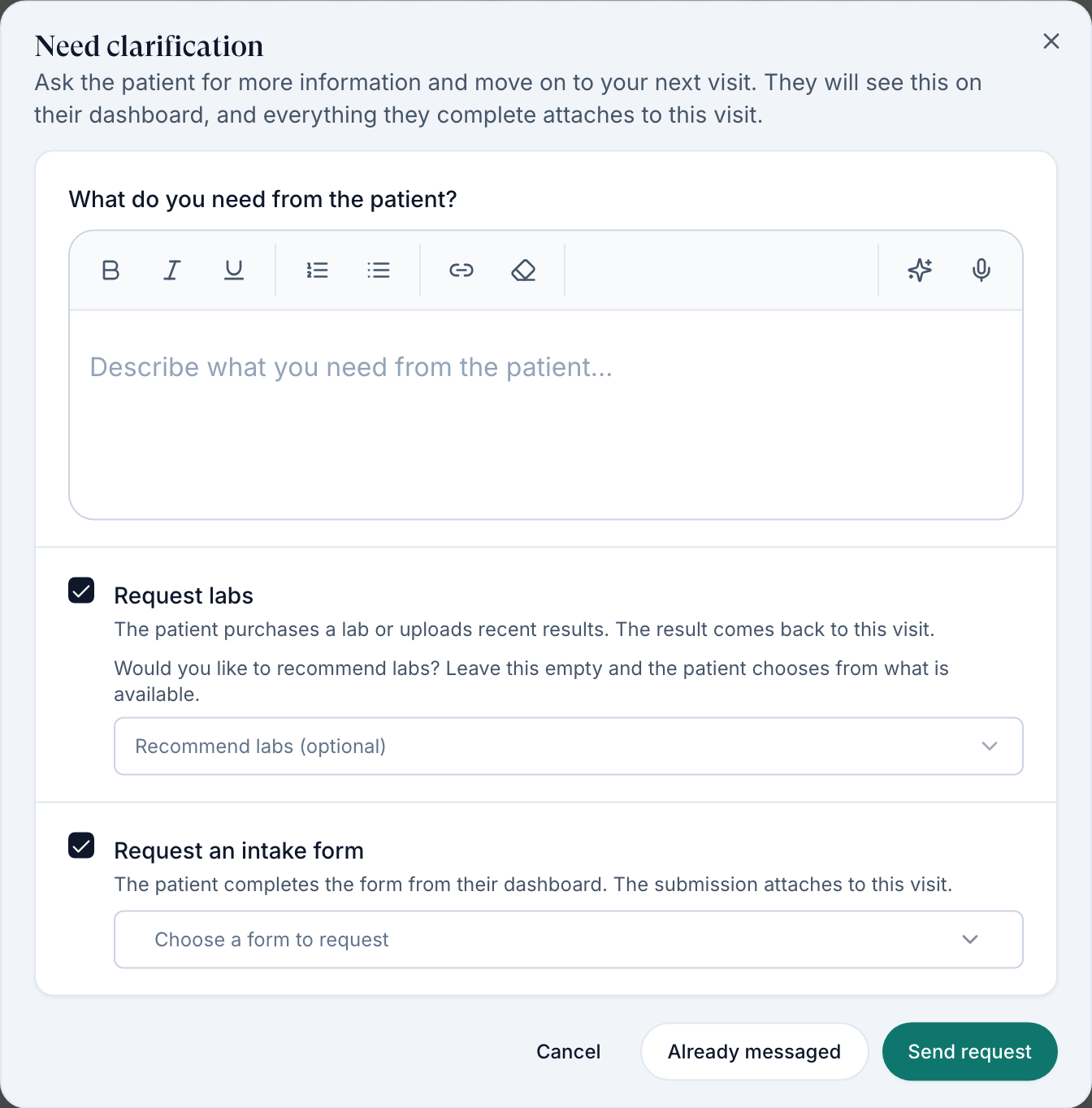
Click Need Clarification at the bottom of the chart. With no intake, Click here to request an intake from the patient. opens it with a form request ready.
Say what you need
Type in What do you need from the patient? The patient reads this.
Add requests
Tick Request labs (optionally Recommend labs) or Request an intake form and choose the form.
Send it
Send request emails the patient and adds a card to their dashboard. Already messaged records it without emailing, and can't carry lab or form requests.
You'll know it worked when Clarification requested appears and the visit waits in Pending Patient Response until the patient answers or completes every request. Results attach to this visit.
Who can do this: the Provider who owns the visit, on async visits.
Defer a visit
Use this when the visit can't go ahead now and should close.
Start a deferral
Tick informed consent and AI review, click Defer, then Defer with reason.
Write both reasons
The Clinical defer reason stays internal. The Patient-safe explanation and next step is what the patient sees. The Internal note is optional and staff-only.
Submit
Click Submit deferred decision.
You'll know it worked when Status set to Deferred appears and the visit moves to Done.
Who can do this: the Provider who owns the visit.
For a missed video visit, use Mark no-show instead: a no-show can rebook free, a deferred patient may have to buy again.
Write and send the prescription
Use this after you approve, or from Done → View Summary.
Open Write a Prescription
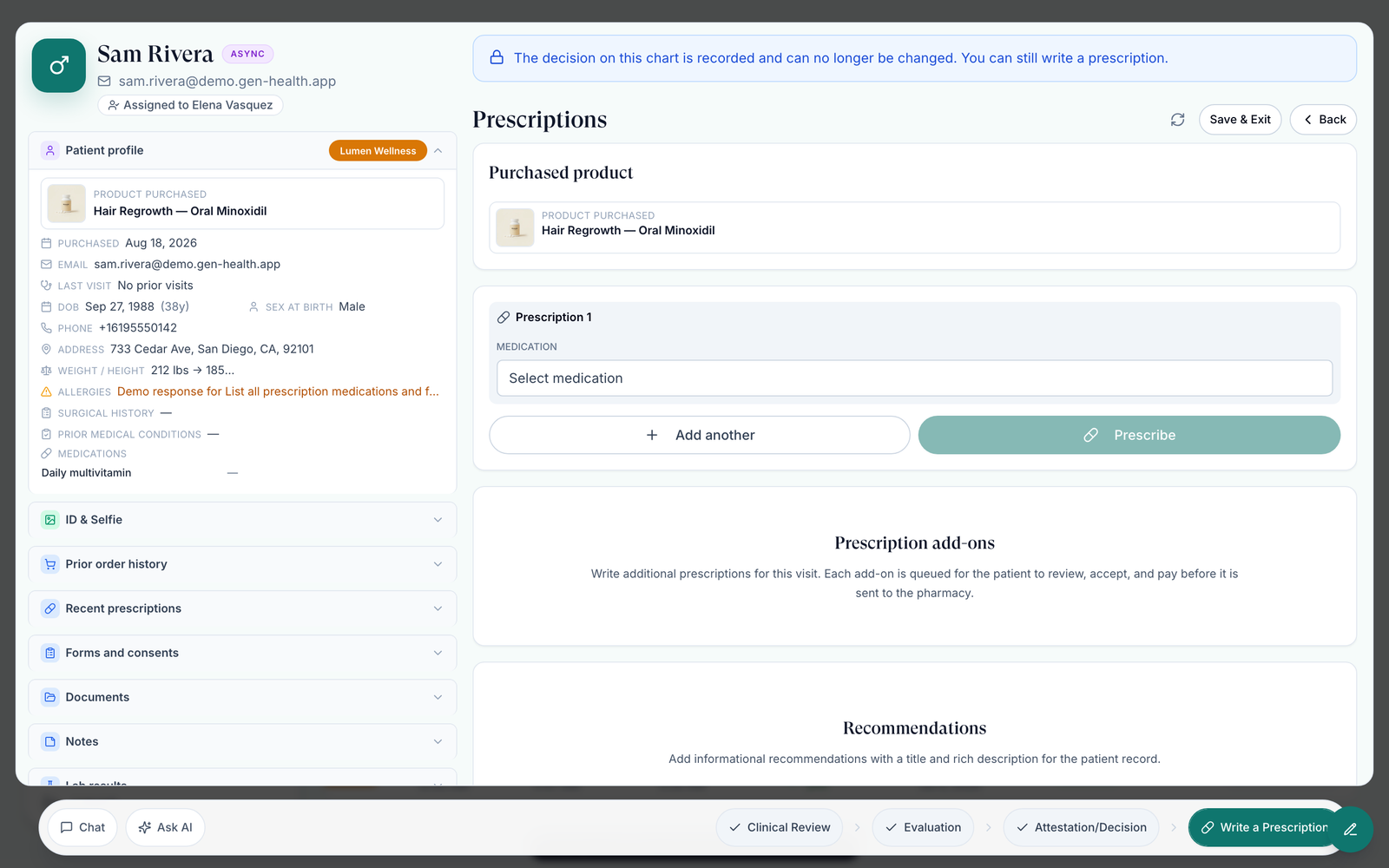
It unlocks once the visit is approved. Purchased product shows what the patient paid for.
Choose the medication
Click Select medication and search, then check the pharmacy, directions and quantity. Add another adds a second script.
Prescribe
Click Prescribe. In Review prescription, click Submit Rx to send now, or Save for later to hold it.
Finish
Read the success window, send the patient a note or click Skip, then Done.
You'll know it worked when the window reads Sent to pharmacy, Prescription queued (it sends itself when the review window ends) or Prescription saved for later.
Who can do this: Provider; Provider Delegates on charts a provider approved.
Save for later never sends on its own. The script waits in Prescriptions until someone clicks Approve & send.
Save and leave a chart
Use this to stop mid-chart.
Click Save & Exit
Top right, then Save & Exit again.
Or press Esc
Notes you typed are kept, but ticked attestations are lost.
You'll know it worked when Progress saved. You can return to this chart later. appears.
Who can do this: anyone who can edit the chart.
What can go wrong
| What you see | Why | Fix |
|---|---|---|
| Write a Prescription or Prescribe greyed out | No approval yet, or no medication chosen | Record Approve, then pick a medication. |
| Only Manual entry, or the purchased medication is missing | The client hasn't paired it, or the paired pharmacy doesn't ship to the patient's state or is switched off | Message the client (Chat) or your admin. It can't be fixed in the chart. |
| Only the provider who completed this review can edit it. | Another provider owns the visit | Ask your admin to reassign it. |
| A 3-month purchase defaults to a 30-day script | Quantity and supply are set when you prescribe | Adjust them, or Add another per month if the pharmacy needs it. |
Questions people ask
What does the "defer" decision do?
It closes the visit as Deferred and shows the patient your explanation. To hand the visit to an MD, use Escalate to MD; to wait for information, use Need Clarification.
Where do providers put an Rx on hold, defer, or require a sync visit from inside a visit?
Defer, Request Sync Visit and Escalate to MD are on Attestation/Decision. To hold a script, choose Save for later.
Can a provider send a script before signing the consult?
Only if your network chose Sign and prescribe together or Prescribe, then sign in Settings → Operations. Ask your Provider Network Admin.
Related
Was this helpful?