
Roles and permissions
Who can do what in a provider network: Provider Network Admin, Provider and Provider Delegate, who can invite whom, changing a role, and switching between your accounts.

A provider network has three account types, and the account's role, not the person's job title, decides what they can open and do. The role is set at invitation: Providers → Add Provider, or Dashboard → Users → Add. Provider Network Admin, Provider, Provider Delegate.
What you can do here
- Pick the right role
- See who can do what
- Invite someone at the right role
- Change someone's role
- Switch between your own accounts
Pick the right role
Choose by the work, before you invite.
Signs off on care or prescribes
Provider. Needs an NPI and verified state licences.
Runs the network
Provider Network Admin: providers, clients, catalog, settings and billing.
Routes and preps work for providers
Provider Delegate: assigns and moves visits, messages patients and preps prescriptions; no clinical decisions.
You'll know it worked when the person's role shows under Type on the Dashboard's Users card.
Who can do this: Provider Network Admin.
See who can do what
Use this when someone says a button or page is missing.
Check their role
Dashboard → Users: read Type on their row.
Find the task below
If their role says No, route the work to someone who can.
| Task | Provider Network Admin | Provider | Provider Delegate |
|---|---|---|---|
| Invite people, deactivate accounts | Yes | No | No |
| Verify licences, approve NPI and hour changes | Yes | Submits their own | No |
| Settings, Billing, Notifications, Providers, Formulary | Yes | No | No |
| Clients | Edit | No | View and comment |
| Protocols, Forms, Labs | Edit | View | View |
| Patients, All Visits, Orders, Messages, Reports, Support | Yes | Yes | Yes |
| Visits (ASYNC) and Visits (SYNC) | Whole network: assign, reassign, void | Their queue: claim, chart, decide | Whole network: assign and reassign; no Claim, no Void, no row-level Prescribe |
| Record Approve, Deny or Defer | No | Yes | No |
| Join video visits | No | Yes | No |
| Prescribe from a chart | No | Yes | Only after a Provider approves it |
| Finalize a client's prescription request | Yes, choosing a Provider | Yes | Yes, choosing a Provider |
| My schedule and On-demand | No | Yes | No |
| ScriptSure | Invite and check enrolment | Open ScriptSure once verified | Opens it for an enrolled prescriber |
| Manage knowledge base content | Yes | Only if you allow it | No |
You'll know it worked when their menu matches their row; a page outside their role shows Page not found.
Who can do this: Provider Network Admin changes accounts.
Invite someone at the right role
Only Provider Network Admins invite people.
Providers
Providers → Add Provider. This always creates a Provider.
Admins and delegates
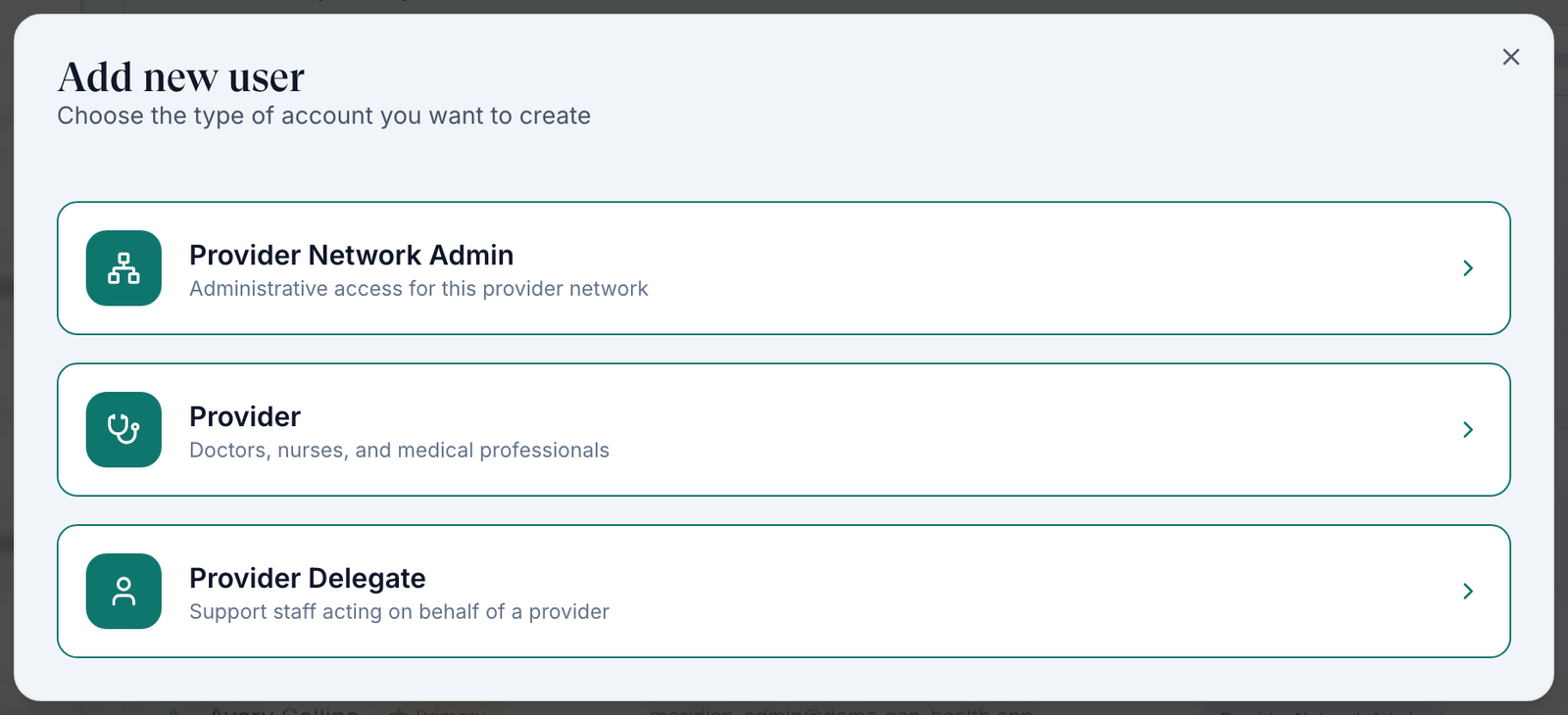
Dashboard → Users → Add → choose the role in Add new user.
You'll know it worked when the toast reads Invitation sent.
Who can do this: Provider Network Admin only. Steps: Providers.
Change someone's role
There is no role change. Replace the account instead.
Remove the old account
Dashboard → Users → row menu: Delete if they never finished setup, otherwise Deactivate.
Invite again
Invite them at the right role, with a different email if the old account still exists.
You'll know it worked when the new row shows the right Type.
Who can do this: Provider Network Admin.
Switch between your own accounts
Use this if you have an admin and a provider account.
Log out
Click Log out, bottom left.
Switch Account
In Confirm Logout, click Switch Account and choose the other account.
You'll know it worked when the menu shows the other role under your name.
Who can do this: anyone with more than one account.
What can go wrong
| What you see | Why | Fix |
|---|---|---|
| As an admin, a chart shows a warning and no Approve button | Only Provider accounts record decisions and prescribe | Reassign the visit to a Provider, or use your own Provider account. |
| A delegate can't claim a visit | Delegates don't claim | Assign it to a Provider under Assigned To. |
| You invited a delegate and they arrived as a Provider | Add Provider always creates a Provider | Delete the pending invite on the Users card and use Add → Provider Delegate. |
| A provider can't see a client's visits | They aren't assigned to that client | Their profile → Capabilities → Assigned clients. |
Questions people ask
Can an admin approve a chart when a provider is away?
No. Reassign it to another Provider; admins don't record clinical decisions or prescribe.
Does a delegate need their own ScriptSure enrolment?
They open ScriptSure for the prescriber they're working for, so that prescriber must be enrolled and verified. You can give the delegate their own ScriptSure access with Invite as basic admin; they can never prescribe.
Related
Was this helpful?