
Messages
Chat with patients, teammates and clinics: start a conversation or patient DM, answer escalated requests, post announcements to clients, and reach all your providers.

Messages is your network's chat workspace: patient care-team threads, private patient DMs, a channel with each client, teammate chats and announcements to clients. Left menu → Messages. Provider Network Admin, Provider and Provider Delegate.
What you can do here
- Start a conversation with a patient, teammate or clinic
- Message a patient privately (DM)
- Answer a provider assistance request
- Post an announcement to your clients
- Reach all your providers at once
Start a conversation with a patient, teammate or clinic
Use this when there is no open conversation with the person yet.
Click New message
Click + at the top of the sidebar. Type a patient, teammate, client contact or channel in To: and press Enter.
Or browse by type
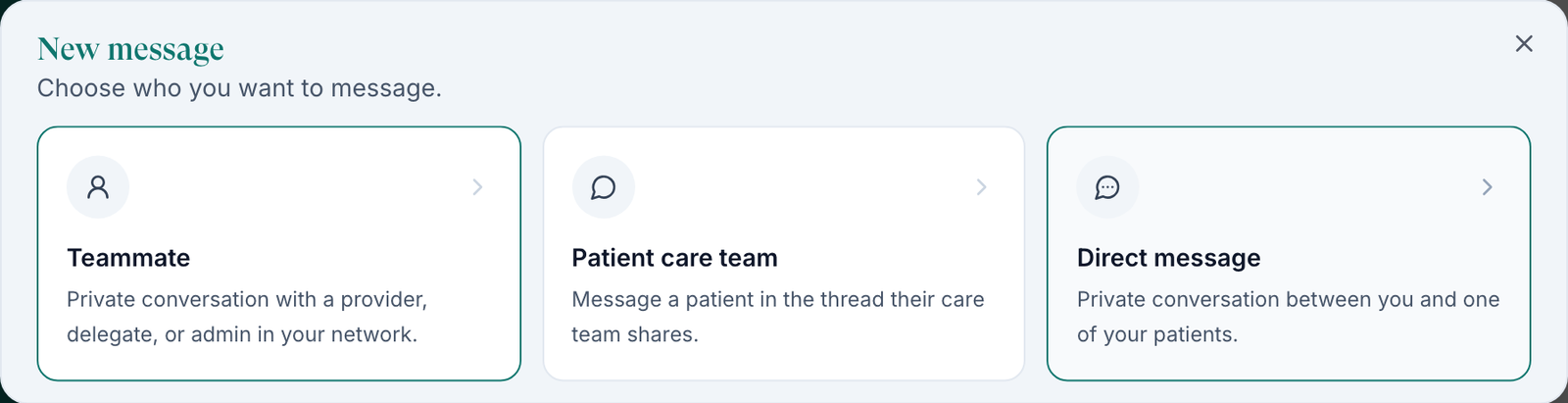
Click Browse message types: Teammate (a provider, delegate or admin in your network), Patient care team (the thread the patient's whole care team shares, clinic staff included) or Direct message. Admins and delegates see Teammate and Patient.
Message a clinic
Click the chevron beside +. Client chat opens the shared channel with a client; Direct staff message opens a one-to-one with someone there, if the client's policy allows it.
You'll know it worked when the conversation opens and appears in your sidebar.
Who can do this: all three roles. Direct message is for Providers only.
Message a patient privately (DM)
Use this for a conversation between you and one patient, outside the shared care-team thread.
Open the picker
+ → Browse message types → Direct message, or the + on the Patient DMs heading. It reads Choose a patient for a private conversation with you.
Pick the patient
Narrow with All clients, search, and click the patient.
Write the first message
Type and send. The clinic can read it but not reply; your network's other providers can reply.
You'll know it worked when the DM appears under Patient DMs. In a visit, the chart's Chat panel shows the same DM on its Direct tab.
Who can do this: Providers.
Answer a provider assistance request
Use this when a clinic has flagged a patient conversation for a provider.
Find the request
Click Escalated in the top bar (Awaiting a provider, oldest first), or look for the Needs provider tag on a conversation.
Read the note
The clinic's note is marked Internal; the patient doesn't see it.
Reply, then resolve
Answer, then click Resolve in the composer.
You'll know it worked when the toast reads Provider request resolved. and the tag clears. To raise one yourself: Conversation actions → Request provider assistance.
Who can do this: all three roles.
Post an announcement to your clients
Use this to tell client admins and staff about a change, such as holiday cover.
Open Announcements
Click Announcements in the sidebar, then New announcement. The chevron beside + → Post an announcement gets you there too.
Choose who it notifies
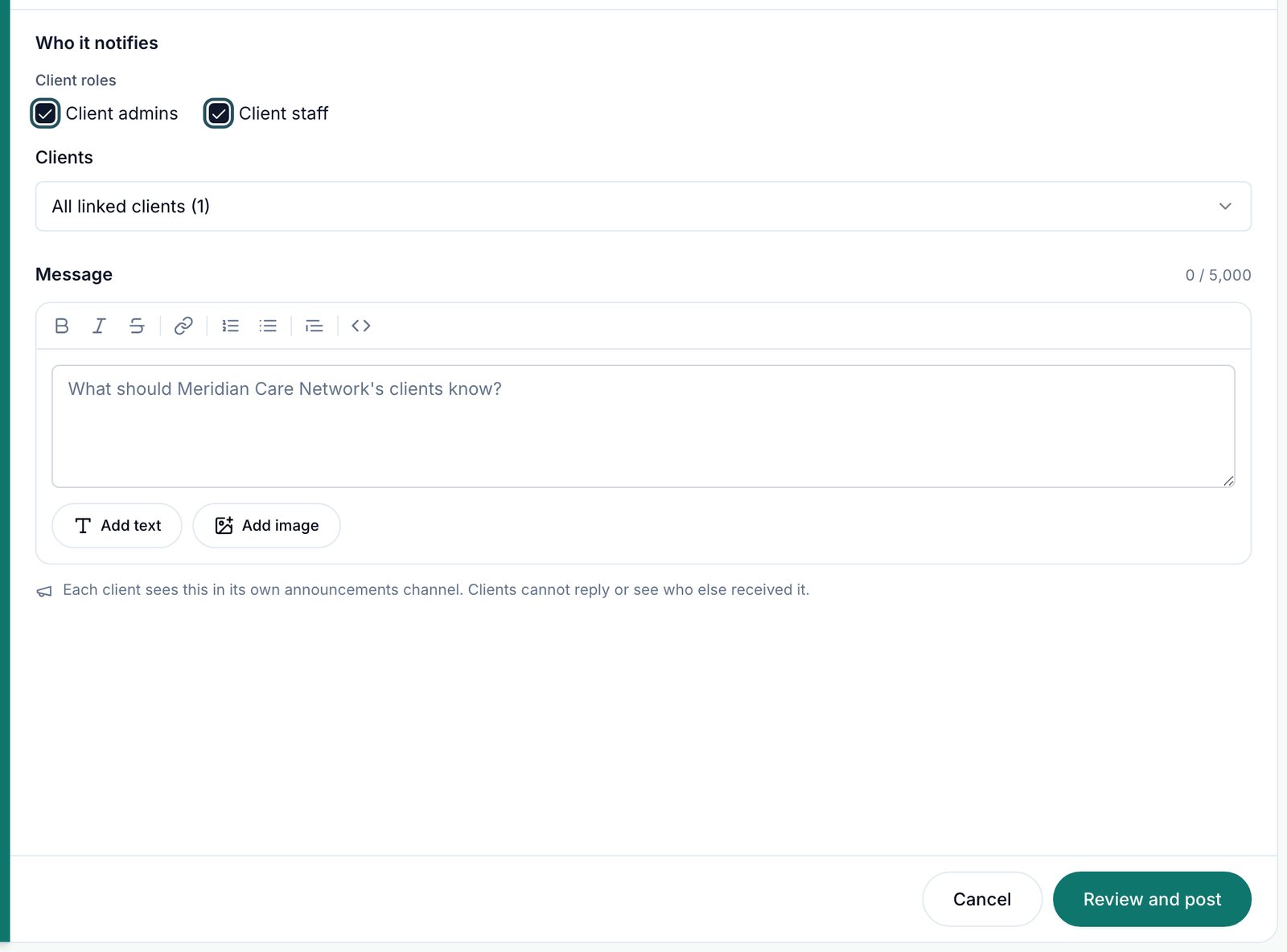
Tick Client admins, Client staff or both. Under Clients pick All linked clients, Clients I choose, Clients offering a product or protocol or Clients created in a date range.
Write it
Type in Message (up to 5,000 characters). Add text and Add image add blocks.
Post
Click Review and post, check it, then click Post announcement.
You'll know it worked when it appears in the Announcements list. Each client sees it in its own announcements channel and cannot reply or see who else got it.
Who can do this: Provider Network Admins with at least one linked client.
Reach all your providers at once
Announcements reach client users only. To reach your own providers:
Email or text them
Open Marketing (it has no menu item: go to /marketing), click New campaign and set Audience to All staff, or By role → Provider. Email needs a verified sending domain first.
Or make it required reading
In Knowledge base, right-click the item → Mark Required. Every Provider and Provider Delegate must open it before they can keep working.
You'll know it worked when the campaign shows as sent, or the item carries a Required tag.
Who can do this: Provider Network Admins. See Marketing and Knowledge base.
What's on this page
| Control | What it does |
|---|---|
| Unreads, Drafts, Later | Unread conversations, unsent messages, and messages you saved. |
| Filter icon | Narrow the list to one client, or to a label. |
| Sliders icon (Configure sections) | Hide or reorder label sections for yourself. Admins also get Manage to create network labels. |
| Row … | Open in window, Archive until next reply, Mute notifications, Resolve conversation. |
| Conversation actions | Change label, Join conversation or Leave conversation, Request provider assistance, Call patient when calling is available. |
| Lock beside Send | Full text texts the whole message to the patient; Secure texts only a link. |
| Start a new message (bottom right) | Chat from any page. |
What can go wrong
| What you see | Why | Fix |
|---|---|---|
| Red dots on conversations already answered | Read state is per person: a colleague's reply doesn't mark it read for you. | Open it, or work from Unreads. |
| You miss your own patients among the whole network's messages | Patient threads are shared across the network. | Use the filter icon for your clients or labels, and Patient DMs for your private chats. |
| You don't want PHI in the patient's text message | The message is set to Full text. | Switch the lock to Secure. Admins set the default under Patient text notifications in Settings → Messaging. |
| No Post an announcement or Manage | You aren't a Provider Network Admin, or no client is linked. | Ask your admin. |
| Direct staff message is greyed out | The client's messaging policy doesn't allow it. | An admin changes it in Settings → Messaging. |
| No Call patient | No phone on file, or the client has no active messaging number. | Message them instead. |
| A patient replied but the visit stayed in Pending Patient Response | Something else it asked for is still outstanding. | On Visits (ASYNC) click Move to In Progress. |
Questions people ask
What's the difference between a patient conversation and a Patient DM?
A conversation under Patients is shared by the whole care team, clinic staff included. A Patient DM is between the patient and one provider; the clinic can read it but not reply.
How do I send one message to every provider in my network?
Not with an announcement; those go to clients. See Reach all your providers.
How do we get emailed when a patient writes?
An admin sets the default in Settings → Operations → Provider notifications → Patient messages. Each person can override it on their profile. Alerts never include the patient's name or message.
Can we auto-reply to patients after hours?
No. There is no automatic reply; set that expectation in your intake and welcome messages.
Related
Was this helpful?