
Settings — Developers
Send visit, provider, client and prescription events to your own systems by signed webhook, pick the events, and check or resend deliveries.
Settings — Developers sends your network's events (visits, providers, clients, prescriptions) to your own systems by signed webhook, and logs every delivery. Left menu → Settings → Developers. Provider Network Admin only.
What you can do here
- Add a webhook endpoint
- Choose which events are sent
- Test, pause, rotate or delete an endpoint
- Check whether a delivery arrived, and resend it
Add a webhook endpoint
Use this when your CRM, data warehouse or operations tool should hear about network events. Your developer gives you the URL.
Start one
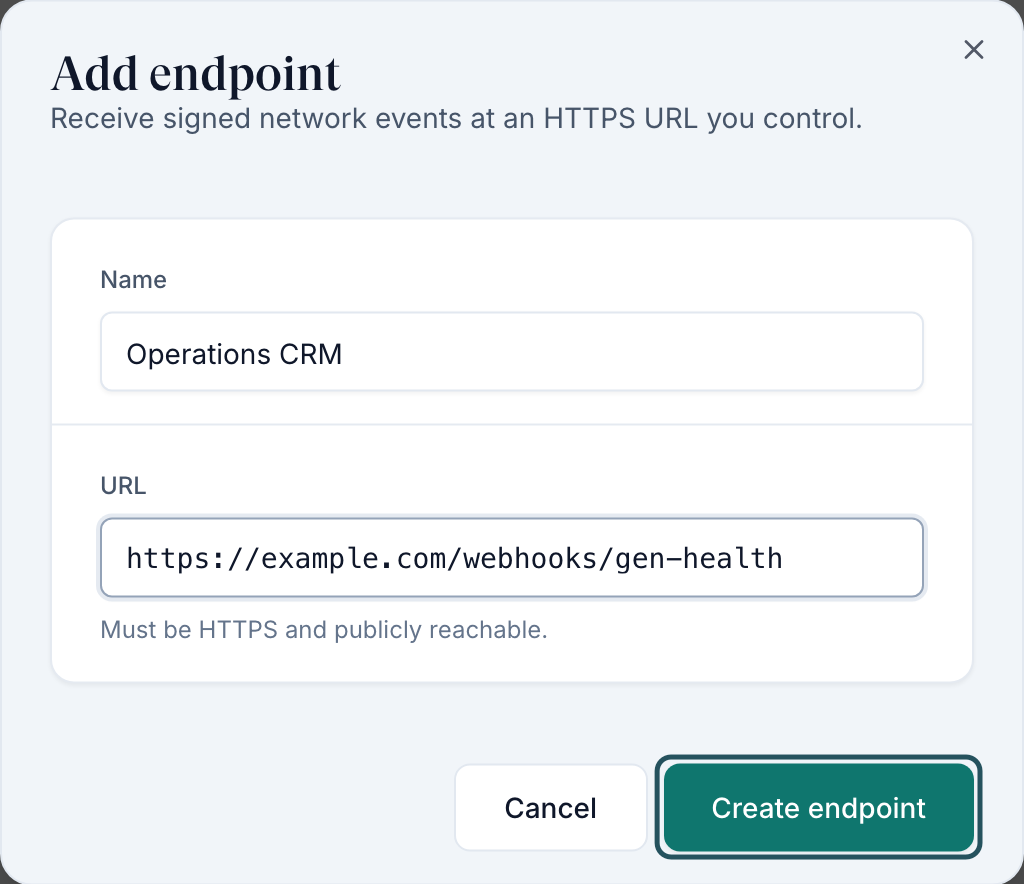
Under Webhook endpoints, click Add endpoint.
Fill it in
Type a Name your team will recognise and the URL. It must be HTTPS and reachable from the internet.
Create it
Click Create endpoint.
Copy the secret now
The Signing secret dialog opens. Click Copy, give it to your developer, then click Done. This secret is shown only once and cannot be retrieved later.
You'll know it worked when the toast reads Endpoint created and the row shows Active. The line above the table counts active endpoints against the limit (five).
Who can do this: Provider Network Admin.
Choose which events are sent
Use this after adding your first endpoint; nothing is sent until you pick events. Every active endpoint receives the same events.
Tick the events
Under Event subscriptions, tick events in Visits, Providers, Clients and Prescriptions, or use a group's Select all.
Save
Discard and Save appear once you change something. Click Save.
You'll know it worked when the toast reads Event subscriptions updated.
Who can do this: Provider Network Admin.
Test, pause, rotate or delete an endpoint
Use this when your developer is testing, or a receiver is down.
Open the row menu
Click the actions button on the endpoint's row: Edit, Send test, Pause (or Re-enable), Rotate secret, Delete.
Test it
Send test sends a ping. The toast reads Test delivered with the HTTP code, or Test failed.
Pause rather than delete
Pause keeps the endpoint and its secret. Events during the pause are logged as Skipped (paused) and can be resent.
Rotate only when ready
Rotate secret stops the old secret at once. Deploy the new one straight away, or deliveries fail verification.
You'll know it worked when the toast confirms it, for example Endpoint paused.
Who can do this: Provider Network Admin.
Check whether a delivery arrived, and resend it
Use this when your system says an event never came.
Filter the log
In Delivery log, use All statuses to show Failed or Skipped (paused). Refresh reloads it.
Open the delivery
Click the row to open Delivery details: the HTTP code, attempts and any error.
Resend
Click Replay. It works for delivered, failed and skipped events, not test pings.
You'll know it worked when the toast reads Replay queued and a new attempt appears.
Who can do this: Provider Network Admin.
Statuses you'll see here
| Status | What it means | Who acts next | What you do |
|---|---|---|---|
| Active | The endpoint receives events | Nobody | Nothing |
| Paused | An admin paused it | You | Re-enable when ready |
| Auto-paused | Paused after repeated failed deliveries | Your developer | Fix the receiver, then Re-enable |
| Pending / Published | Queued or on its way | GEN Health, automatically | Wait, then Refresh |
| Delivered | Your endpoint accepted it | Nobody | Nothing |
| Failed | Your endpoint refused it or didn't answer | Your developer | Read the error, fix, then Replay |
| Skipped (paused) | It happened while the endpoint was paused | You | Re-enable, then Replay |
What can go wrong
| What you see | Why | Fix |
|---|---|---|
| Your system says events stopped, but the log shows Delivered | GEN Health sent them; the problem is on the receiving side | Give your developer the delivery details from the log. |
| Endpoint URL must use HTTPS. | The URL starts with http:// | Use an HTTPS URL. |
| Add endpoint is greyed out | Five endpoints are already active | Pause or delete one first. |
| Everything fails right after a rotation | The old secret stopped working immediately | Deploy the new secret. |
| No deliveries yet. after adding an endpoint | No events are ticked and saved | Tick events in Event subscriptions and click Save. |
Questions people ask
Should our clients' developers use the V1 or V2 API?
V2. Client API keys and client webhooks are on the client's own Settings — Developers. This page has network webhooks only; there are no API keys here.
Can one endpoint get visits and another prescriptions?
No. Network-wide: every active endpoint receives the same selected events. Filter on your side.
I lost the signing secret. Can I see it again?
No. Use Rotate secret to get a new one, and deploy it straight away.
Is there an event for pharmacy shipping or delivery?
Not on this page. Here you get prescription.created, prescription.updated and prescription.deleted. Ask in a GEN Health ticket under Technical issue / bug if you need more.
Related
Was this helpful?