
Integrations
Choose which pharmacies your providers prescribe to, switch lab connectors on or off, start ScriptSure set-up, and (for providers) connect Google Calendar.

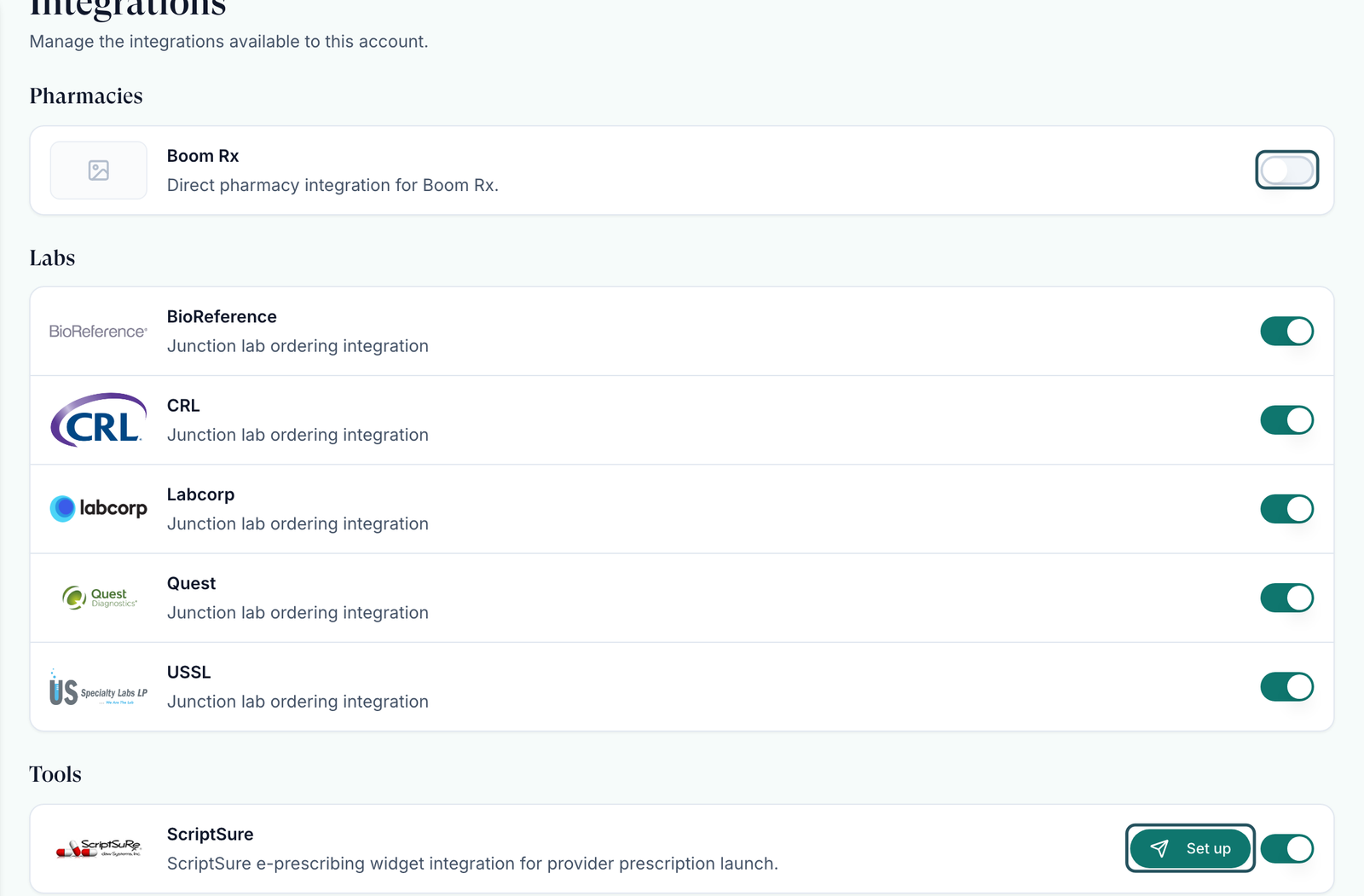
Integrations lists the pharmacies your providers can prescribe to, your lab connectors, and tools such as ScriptSure and Google Calendar. Left menu → Integrations. Provider Network Admin manages it; Providers and Provider Delegates see it read-only, and Providers connect their own Google Calendar here.
What you can do here
- Choose which pharmacies your providers prescribe to
- Turn a lab connector on or off
- Set up ScriptSure e-prescribing
- Connect your Google Calendar (Providers)
Choose which pharmacies your providers prescribe to
Use this when you add a pharmacy partner, or stop using one. GEN Health decides which pharmacies are available; you decide which ones your network sends to.
Find the pharmacy
Under Pharmacies, each row shows the pharmacy and, where known, how many states it ships to. Hover that badge to see Does not ship to: and the states.
Add your own account keys, if asked
Some pharmacies, such as Boom Rx, need your own account with them. Click the key icon on the row, fill the fields the form lists, and save. The switch appears once the keys are in.
Switch it on or off
The switch reads Prescribe to the pharmacy while off, and Stop prescribing to it while on. Off means your providers no longer see it when they prescribe.
You'll know it worked when the switch shows the new state; after saving keys the toast reads Pharmacy credentials saved.
Who can do this: Provider Network Admin. Clients' own pharmacy choices and pairings are made on their side.
Turn a lab connector on or off
Use this if your protocols never use one of the labs listed. Lab connectors are set up by GEN Health.
Find the lab
Under Labs, each connector (for example Quest or Labcorp) has a switch.
Switch it
The switch reads Disable the lab while on, and Enable it while off.
You'll know it worked when the lab's panels appear on, or leave, the Labs page.
Who can do this: Provider Network Admin. To add a lab that isn't listed, raise a ticket in Support to GEN Health.
Set up ScriptSure e-prescribing
Use this once, before your providers e-prescribe through ScriptSure, which carries controlled medications.
Open set-up
Under Tools, keep the ScriptSure switch on and click Set up.
Send yourself the invite
Click Start ScriptSure setup. Complete the ScriptSure steps from the email; that creates your network's practice.
Enrol your team
Back here, the button reads Manage setup. Use it to invite providers and delegates. The full flow is in ScriptSure.
You'll know it worked when the row shows Business connected beside Manage setup.
Who can do this: Provider Network Admin. Each provider then finishes their own ScriptSure identity check.
Connect your Google Calendar (Providers)
Use this if you're a Provider and keep your own Google calendar, so patients can't book you when you're busy.
Open Integrations
Left menu → Integrations. Google Calendar is the first row under Tools.
Connect
Click Connect and sign in with your Google account.
Choose your calendars
Click Manage calendars. Pick where new visits go in Write new visits to, and tick the calendars under Check busy time on. Keep Auto-sync on.
You'll know it worked when the row reads Connected and Connected as your Google email.
Who can do this: Providers only, for their own calendar. Admins and delegates don't see this row. Reconnect and Disconnect are on the same row.
What can go wrong
| What you see | Why | Fix |
|---|---|---|
| Providers can't find a client's product when they prescribe | The product is paired to a pharmacy that is switched off here (its switch reads Prescribe to) | Switch the pharmacy on, or ask the client to pair the product to a pharmacy you use. |
| A pharmacy never shows for patients in some states | It doesn't ship there; those states are blocked automatically | Hover the coverage badge, and pair a second pharmacy that covers the state. |
| Orders fail saying the pharmacy payment must be updated | The client's card with that pharmacy failed | The client's admin opens their Integrations → Pharmacies → Update OnlyScripts payment method, then the prescription is resent. |
| A pharmacy or lab you want isn't listed | Only GEN Health adds integrations | Raise a ticket in Support to GEN Health naming the pharmacy or lab. |
| No Set up button on ScriptSure | Its switch is off, or you aren't a Provider Network Admin | Switch ScriptSure on, then look again. |
Questions people ask
Our clients keep getting a pop-up asking for an OnlyScripts API key. Should they enter one?
No. The key is created when the client's first admin finishes setup. If the prompt keeps appearing, raise a GEN Health ticket naming the client.
A client asks if a pharmacy was removed. Was it?
Check this page first: if the pharmacy is listed and on, it's still available. Clients switch pharmacies on and off on their own Integrations page.
Can a provider change anything here?
No. Providers and delegates see the page read-only. A Provider can only connect their own Google Calendar and see their ScriptSure status.
Related
Was this helpful?