
ScriptSure
Set up ScriptSure for your network, enrol prescribers and delegates, clear "Pending Verification", fix the "verified ScriptSure prescriber mapping" error, and open ScriptSure as a provider.

ScriptSure is the e-prescribing system your providers open from GEN Health; its row is where you set it up, enrol prescribers and see who can e-prescribe. Left menu → Integrations → Tools → ScriptSure. Provider Network Admin; Providers see their status and Open ScriptSure there. Available once GEN Health turns ScriptSure on for your network.
What you can do here
- Set up ScriptSure for your network
- Enrol a prescriber
- Give a delegate ScriptSure access
- Clear "Pending Verification"
- Fix a "verified ScriptSure prescriber mapping" error
- Finish your own enrolment (providers)
Set up ScriptSure for your network
Do this once, before enrolling anyone. It creates your network's ScriptSure practice.
Turn it on
On the ScriptSure row under Tools, make sure the switch is on.
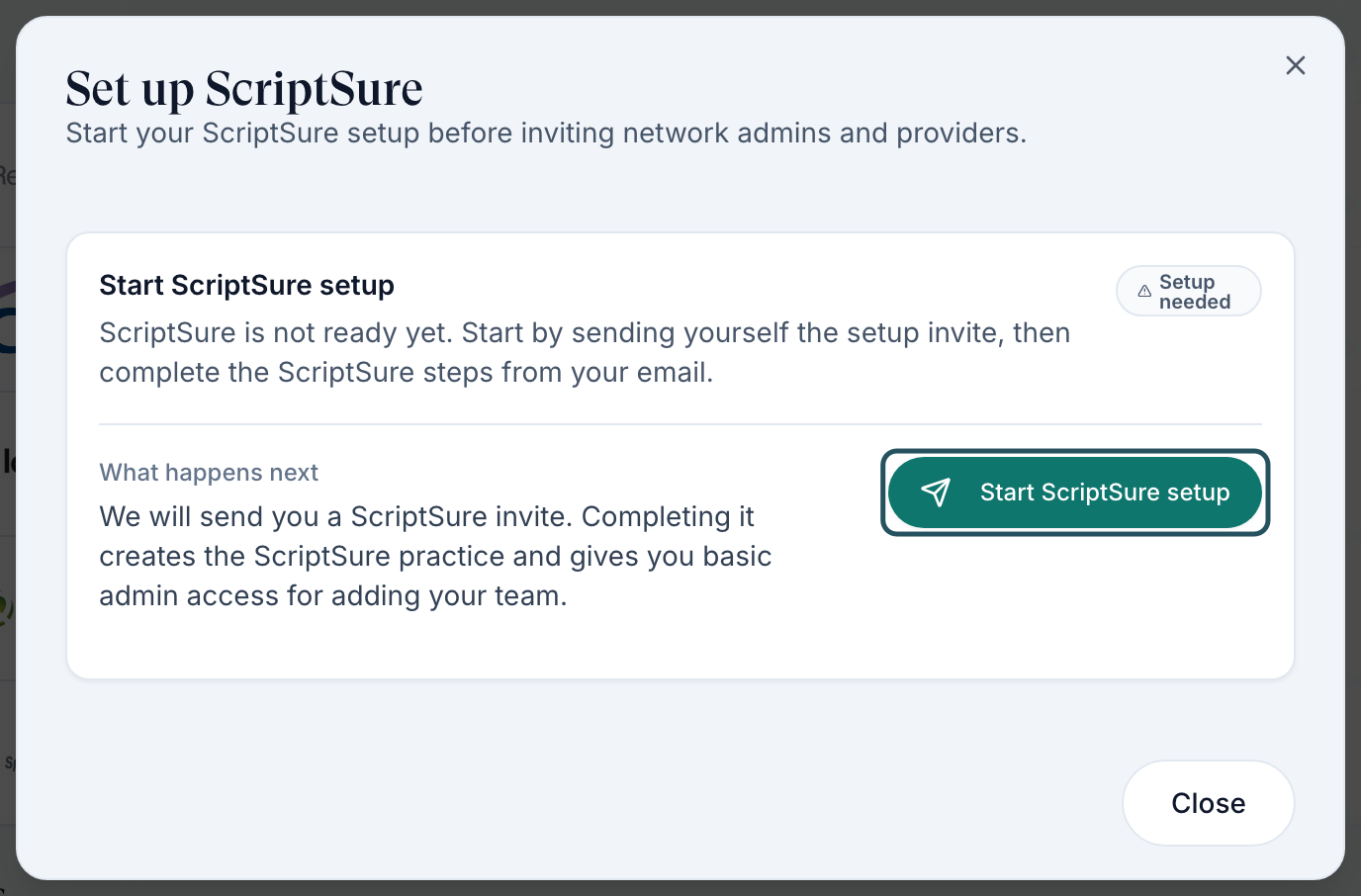
Start setup
Click Set up, then Start ScriptSure setup. The invite goes to you, the admin clicking. If it's greyed out, the red list above it says what to fix.
Finish it from your email
Open the ScriptSure email and complete its steps to create the practice.
Come back and check
Reopen Integrations. The row shows Business connected and the button reads Manage setup.
You'll know it worked when the toast reads Practice setup invite sent, and later Business connected appears.
Who can do this: Provider Network Admin. If the email is lost, use Copy invite link or Resend invite on the same card; don't start a second setup.
Enrol a prescriber
Use this for every Provider who will send prescriptions through ScriptSure.
Open the users table
Click Manage setup. ScriptSure users lists active providers and delegates with their Enrollment Status; the Enrolled, Pending and Not invited chips filter it.
Invite them
Click Invite as provider. If it's greyed out, hover it: a missing NPI or special characters in their name block it; An active invite or ScriptSure mapping already exists. means they're under way.
They finish in ScriptSure
They open the email, create their ScriptSure account and complete the ID.me identity check.
Check their status
Click Check status on their row.
You'll know it worked when the row reads Verified, ScriptSure ID is filled in, and the provider sees Open ScriptSure on their Integrations row.
Who can do this: Provider Network Admin. If the invite email could not be queued, click Copy link and send it yourself.
Give a delegate ScriptSure access
Use this for a Provider Delegate who needs their own ScriptSure login. Delegates can never prescribe.
Invite as basic admin
In Manage setup, click Invite as basic admin on their row.
They finish the email
They create their ScriptSure account. When a delegate opens ScriptSure for a prescriber, it runs under that prescriber, who must be Verified.
You'll know it worked when the toast reads Basic admin invite sent.
Who can do this: Provider Network Admin.
Clear "Pending Verification"
ScriptSure doesn't tell GEN Health when a provider's identity check is approved, so the status only moves when it's checked.
Confirm they finished ID.me
Ask the provider whether they completed the identity check at the end of their ScriptSure setup.
Click Check status
Manage setup → their row → Check status.
If it doesn't change
Their identity check isn't approved yet. The provider follows up with ScriptSure; GEN Health can't approve it.
You'll know it worked when the toast reads ScriptSure enrollment updated and the row reads Verified.
Who can do this: Provider Network Admin. GEN Health also rechecks, at most every 10 minutes, when someone views the status.
Fix a "verified ScriptSure prescriber mapping" error
Use this when a provider sees A verified ScriptSure prescriber mapping is required… or Provider must have a verified ScriptSure prescriber mapping before ScriptSure can open.
Find the prescriber
Integrations → ScriptSure → Manage setup, and search for them.
Act on their status
Use the status table below: invite, wait for them, Check status, or Send fresh invite.
Retry the prescription
Once the row reads Verified, the provider reopens the chart and prescribes again.
You'll know it worked when the prescriber can pick the ScriptSure pharmacy, or ScriptSure opens.
Who can do this: Provider Network Admin fixes the enrolment; the provider retries.
Finish your own enrolment (providers)
Use this after your network admin sends your ScriptSure invitation.
Open the invitation email
Follow its link, set up your ScriptSure account and complete the ID.me identity check.
Check your status
Left menu → Integrations → ScriptSure shows your status, or Open ScriptSure when you're ready.
You'll know it worked when Open ScriptSure appears on the row.
Who can do this: Provider. Blocked means your admin has something to fix first, often your NPI.

Statuses you'll see here
| Status | What it means | Who acts next | What you do |
|---|---|---|---|
| Not Invited | No invite yet | You | Invite as provider or Invite as basic admin. |
| Blocked | NPI, name or practice setup stops the invite | You | Hover the badge and fix each item. |
| Invite Sent / Invite Resent | The email is out | The provider | Chase them; Resend or Copy link if lost. |
| Account Created / Proofing | They started ScriptSure setup | The provider | Ask them to finish, then Check status. |
| Pending Verification | Identity check not confirmed | You | Check status. |
| Verified / Ready | Enrolled | No one | Nothing; they can e-prescribe. |
| Role Update Required | Their ScriptSure account isn't set up as a prescriber | You | Send fresh invite. |
| Invite Expired / Invite Revoked / Rejected | Dead link, or identity refused | You; for Rejected, the provider first | Send fresh invite. |
What can go wrong
| What you see | Why | Fix |
|---|---|---|
| The ScriptSure row is missing, or inviting fails with failed to fetch | GEN Health hasn't turned ScriptSure on for your network yet | Raise a ticket in Support. |
| Start ScriptSure setup is greyed out | Something is missing, listed in red above the button | Fix each item (often a 10-digit phone number), close and reopen. |
| A provider says they never got a new enrollment link | They may already be enrolled | Check their row. If it reads Verified, they use Open ScriptSure; otherwise Resend. |
| Nothing opens, or Unable to open ScriptSure. | A pop-up blocker, or the prescriber isn't verified | Allow pop-ups for GEN Health and try again; check the prescriber's status; then raise a ticket in Support. |
| Prescribing through ScriptSure showed nothing and the script seems lost | It may be waiting for approval | Check Prescriptions before sending again. |
Questions people ask
Do we use our own ScriptSure or Surescripts credentials?
No. GEN Health connects ScriptSure for you; you set up the practice and enrol your providers here.
Resend or Send fresh invite?
Resend emails the same link when it's still valid. Send fresh invite makes a new one when the old link expired, was revoked, or the account needs prescriber access.
Does being enrolled let a provider prescribe anywhere?
No. They still need a verified licence in the patient's state, and a DEA for controlled medications.
Related
Was this helpful?