
Formulary
Pair pharmacy medications with protocols (pairing or mapping), set the default sig and days supply, add custom medications, hide what you don't offer, and find out why a medication can't be prescribed in a state.

Formulary is your network's list of pharmacy medications: pair them with protocols (pairing, also called mapping), set the default directions (sig) providers start from, and hide what you don't offer. Left menu → Formulary. Provider Network Admin only.
What you can do here
- Find a medication and what it costs
- Pair medications with a protocol
- Set directions and days supply
- Add a medication your pharmacies don't carry
- Hide a medication you don't offer
- Find out why a medication can't be prescribed in a state
Find a medication and what it costs
Use this to check who carries a medication, in which strength and at what price.
Search or filter
Type in Search medications or SKU…, click a pharmacy pill to show one pharmacy, or use All categories, Directions and All Pairings.
Read the row
Check Strength, Form and Package size before pairing. Price, Shipping and Total are the pharmacy's charges, not the patient price.
You'll know it worked when the table shows only the matching rows.
Who can do this: Provider Network Admin. Rows come from the pharmacies enabled for your network in Integrations.
Pair medications with a protocol
Use this so providers see the right medication when they prescribe for that protocol. Your pairings are the defaults every client inherits.
Open the pairing
Click the Protocols cell on the medication's row (it reads No pairings until you pair one). From the other side: Protocols page → the row's Formulary cell.
Tick the protocols
Tick each protocol this exact strength and size should back, then click Done.
Pair for one client, if needed
A client's own choices override yours: open the client's profile → Client View → Products and click Needs pairing or the product's Paired formulary cell.
You'll know it worked when the cell shows the protocol count, and the protocol's Formulary cell counts up.
Who can do this: Provider Network Admin. Pairings are per strength and pharmacy, not per molecule.
Set directions and days supply
Use this so prescriptions start with your approved sig, quantity and supply.
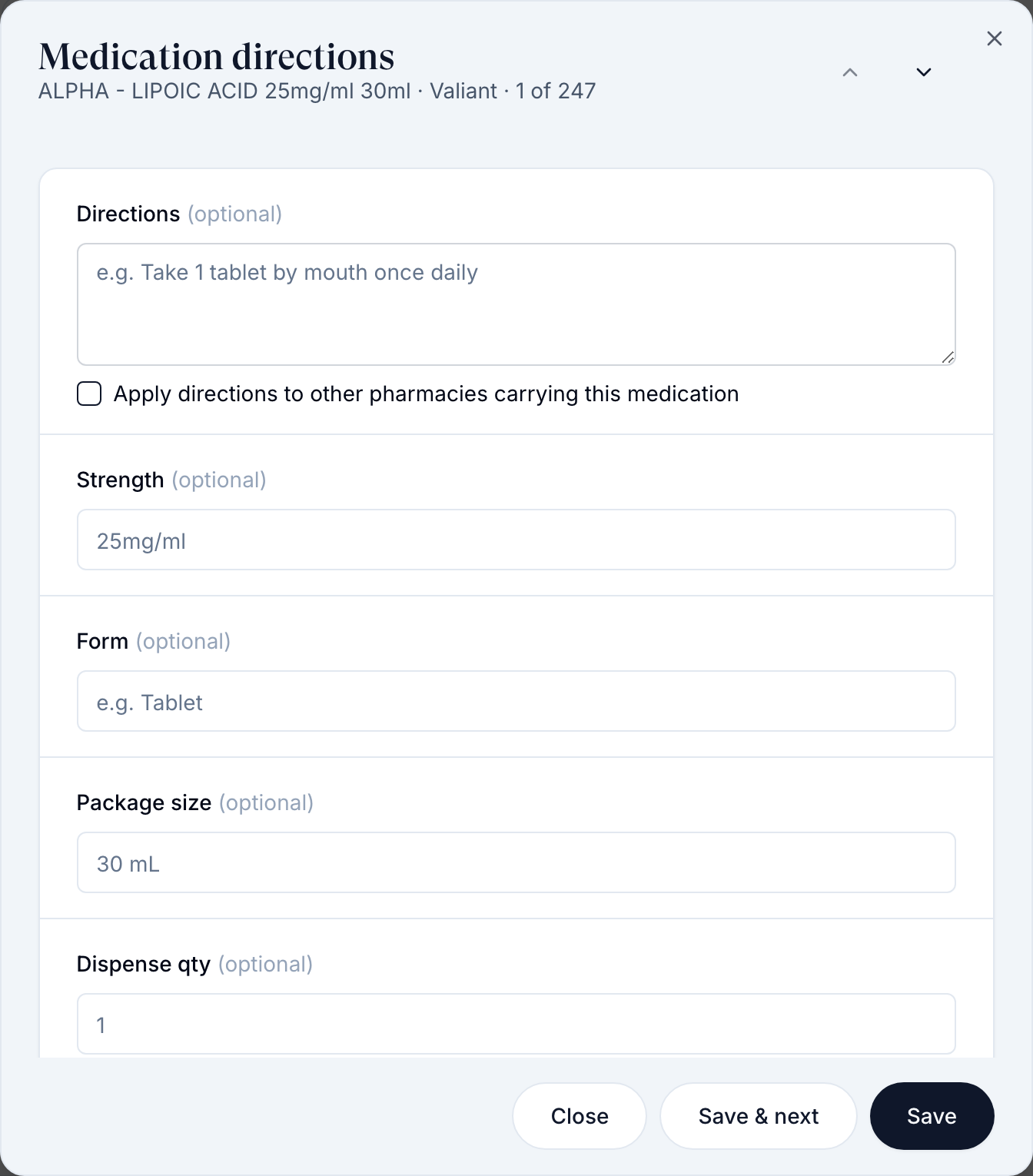
Open Medication directions
Click Directions or the pencil (Edit) on the row.
Fill the defaults
Write Directions, then Dispense qty and Days supply. Tick Apply directions to other pharmacies carrying this medication to copy the sig. Clinical difference and Medical necessity are for pharmacies that require them.
Save
Click Save, or Save & next to move down the list.
You'll know it worked when the row's Directions and Days supply columns show your values.
Who can do this: Provider Network Admin. Providers can still change every field when they prescribe.
Add a medication your pharmacies don't carry
Use this for a medication the patient fills elsewhere.
Open Custom formulary
Click Add custom formulary.
Fill and add
Type Medication name and the optional fields (Directions, Quantity, Days supply…), then click Add medication.
You'll know it worked when it's listed under Custom medications and can be paired in the table.
Who can do this: Provider Network Admin. Custom medications are save-only: they're recorded on the prescription but never sent to a pharmacy.
Hide a medication you don't offer
Use this to take a medication out of use across your network.
Hide it
Click Hide (the eye icon) on the row, or tick several rows and use Hide in the toolbar.
Bring it back
Click Show hidden, then the eye icon on the row.
You'll know it worked when the row leaves the list and Show hidden shows a count.
Who can do this: Provider Network Admin. Hiding is network-wide: the medication disappears from pairing choices and from prescribing for every client's orders with your network.
Find out why a medication can't be prescribed in a state
Use this when a provider says the medication is missing, or sees This medication does not ship to the patient's state.
Check the pharmacy's coverage
In Integrations, hover the pharmacy's state badge. It reads All 50 states, or a count such as 38/50 states; hover it for Does not ship to: and the list. Providers only see pharmacies that ship to the patient's state; nothing reroutes automatically.
Pair a pharmacy that ships there
Pair the same medication from another pharmacy, for the client's product or your protocol.
Check the protocol
On Protocols, make sure the state isn't in the protocol's Unavailable states.
You'll know it worked when the provider can pick the medication for that patient.
Who can do this: Provider Network Admin. Which pharmacies a client has switched on is the client's choice; ask them to enable one that ships to the state.
What can go wrong
| What you see | Why | Fix |
|---|---|---|
| No formulary medications returned for enabled pharmacies. | No pharmacy enabled for your network returns a catalog | Check Integrations → Pharmacies, then ask GEN Health Support. |
| A medication is in Formulary but not in a client's pairing list | It's hidden by your network or the client | Click Show hidden and unhide it. |
| Remove only, Hidden medication or Inactive pharmacy on a pairing | The medication is hidden or its pharmacy is off, so the pairing can only be removed | Unhide it, or pair a current medication. |
| Pharmacy prices are missing when pairing for a client | The pharmacy hasn't published prices for that item | Pair another pharmacy's version, or ask Support. |
| Every GLP-1 prescription starts with the wrong sig | The default directions on those rows are wrong | Fix them in Medication directions and tick Apply directions to other pharmacies. |
| A provider sees only Manual entry | The client's product isn't paired, its pharmacy doesn't ship to the state, or the client's pharmacy keys are missing | Pair it, or message the client to enable a pharmacy. |
Questions people ask
Does Hide on the formulary hide an item system-wide or only filter my view?
Network-wide. It's removed from pairing and prescribing for all your clients' orders.
Where do we adjust days supply for a custom formulary item?
Find it in the table and click Directions or the pencil, then set Days supply.
Is there a filter for pharmacies that ship to all 50 states?
No. Check each pharmacy's state badge in Integrations.
Can providers save their own SIG templates?
No. Standardise the sig in Medication directions; it pre-fills for every provider.
Is the price column what the patient pays?
No. It's the pharmacy's charge. The client sets the patient price on its products.
Related
Was this helpful?