
Support
Work your clients' tickets every day: triage, assign to a provider and answer them, and raise your own tickets with GEN Health or OnlyScripts.

Support is where your linked clients' tickets reach your network, and where you raise your own tickets with GEN Health or OnlyScripts. Left menu → Support. Provider Network Admin runs the client queue; Providers and Provider Delegates answer tickets assigned to them and raise their own.
What you can do here
- Check the client queue every day
- Answer a client's support ticket
- Raise a ticket with GEN Health or OnlyScripts
- Answer a ticket assigned to you (Providers)
Check the client queue every day
Clients send your network tickets about stuck reviews, prescriptions and orders. More than half of these tickets have never had a reply, and clients read silence as nobody working the queue. Nothing in the left menu counts them.
Open Incoming Requests
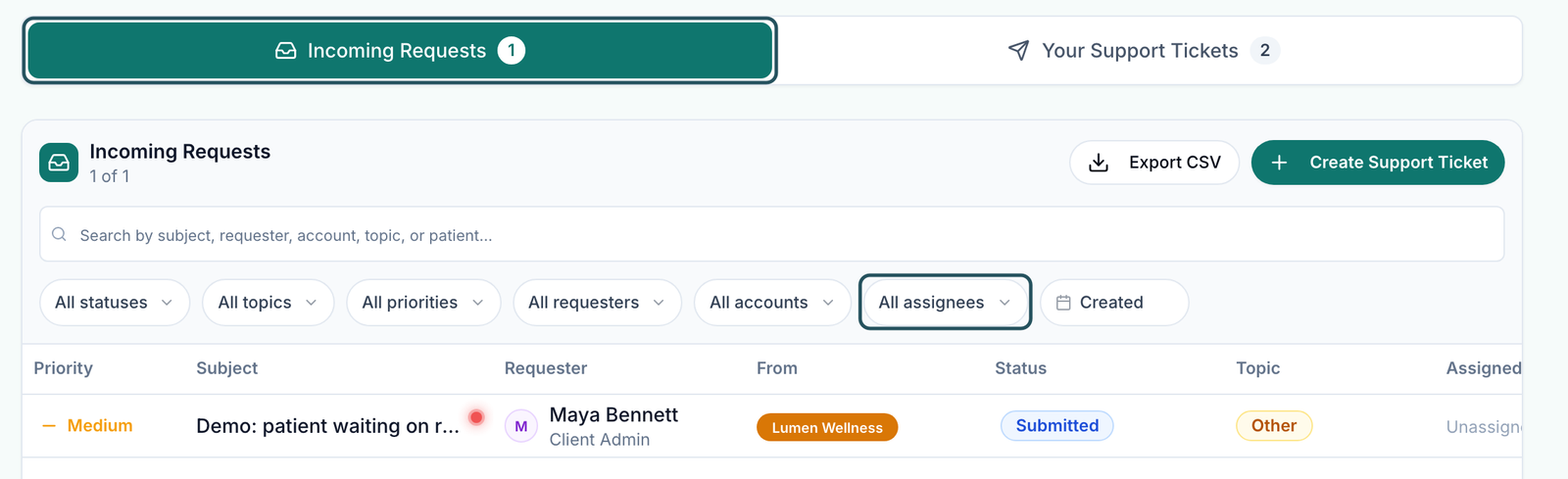
Left menu → Support. Incoming Requests is the first tab; its number is how many tickets clients have sent you.
Find what nobody owns
Use All assignees → Unassigned, and All statuses → Submitted. Filters only list values that exist in the queue.
Set priority from the row
Click the Priority cell and choose Informational / Request, Standard / Normal or Critical / Blocker.
You'll know it worked when every ticket has an owner under Assigned and nothing sits in Submitted for more than a day.
Who can do this: Provider Network Admin.
Answer a client's support ticket
Use this for any ticket in Incoming Requests. Answer it yourself or hand it to the provider who knows the patient.
Open it
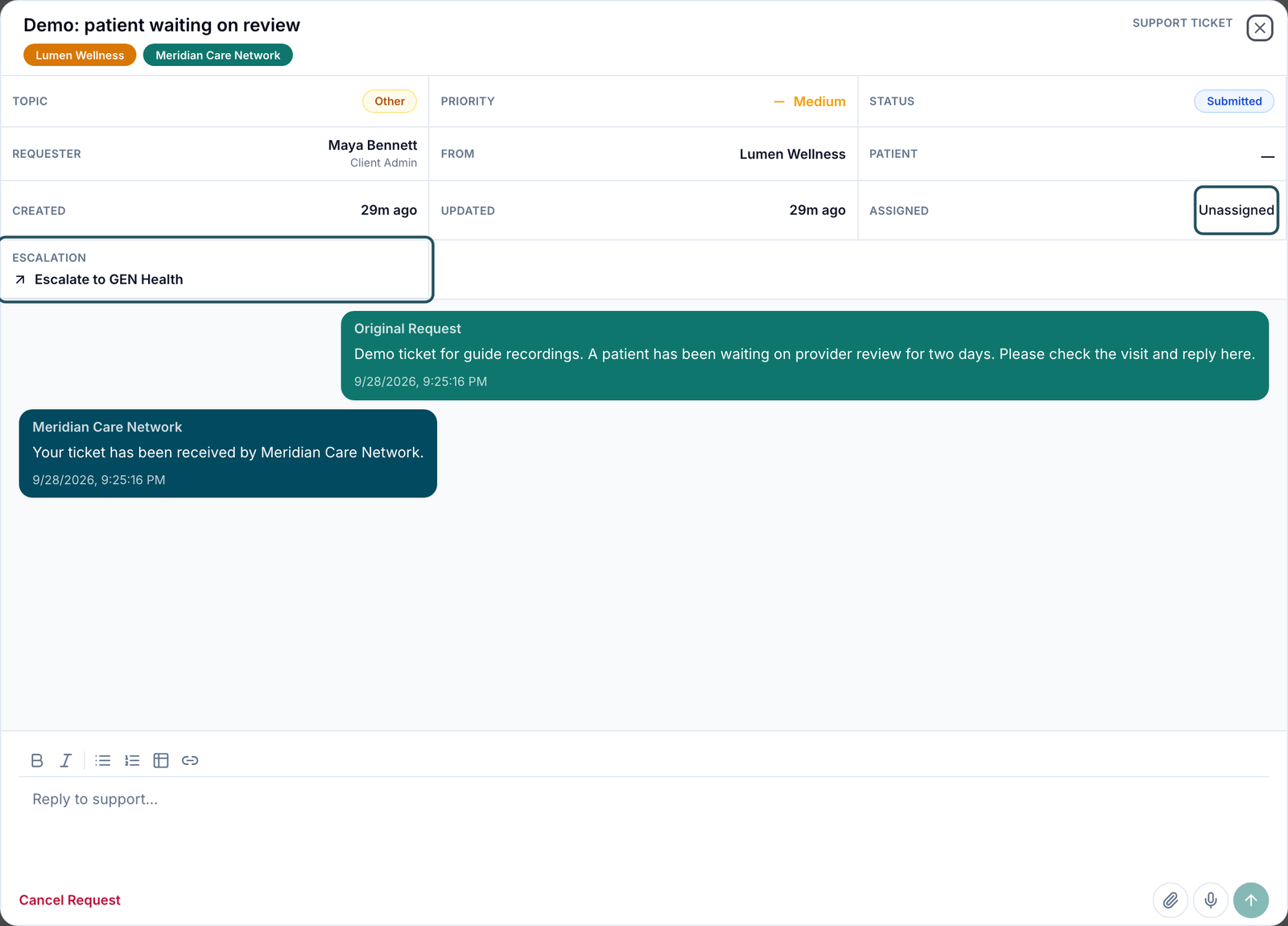
Click the ticket. The Support Ticket window shows the request, the client, and PRIORITY, STATUS and ASSIGNED.
Assign it
Click Unassigned under ASSIGNED and pick an admin, provider or delegate. Search people filters the list.
Reply
Type in the reply box at the bottom and click Send support message (the send arrow). Attach a file with Attach files.
Update the status
Click STATUS: Processing while you work, Response Requested when you need the client, Complete when it's solved. Don't use Cancel Request to close it; that marks it Cancelled.
Hand platform problems to GEN Health
If it's a software problem, click Escalate to GEN Health. The ticket leaves your queue and your organisation loses access to it.
You'll know it worked when your reply shows in the thread, and the row's Assigned and Status cells show the new values.
Who can do this: Provider Network Admin. An assigned Provider or Provider Delegate can reply but not change status or priority.
Raise a ticket with GEN Health or OnlyScripts
Use this when something in the platform is broken, or a pharmacy order needs OnlyScripts.
Start it
Click Create Support Ticket, top right.
Pick who it's for
GEN Health: access, set-up, billing, integrations, bugs, ScriptSure. OnlyScripts: prescription status, pharmacy fulfilment and shipping for one patient.
Pick the topic
The topics depend on who it's for, for example Technical issue / bug or Pharmacy & formulary.
Describe it
Fill Subject and Description: the page, what you did, what you expected, what happened, and when. OnlyScripts tickets also need the patient and the prescription or order. Click Next.
Set priority and attach
Priority is required for network roles. Add order, Add prescription, Add patient or Add user links the record; drop screenshots in FILES.
Send it
Click Submit ticket.
You'll know it worked when it appears under Your Support Tickets as Submitted. You're notified when support replies or changes its status.
Who can do this: Provider Network Admin, Provider, Provider Delegate.
Answer a ticket assigned to you (Providers)
Use this when your admin assigns you a client's question about your patient.
Open it
Left menu → Support → Incoming Requests. You see only tickets assigned to you.
Reply
Type in the reply box and click Send support message. Tell your admin when it's solved so they can close it.
You'll know it worked when your reply shows in the thread.
Who can do this: Provider, Provider Delegate. Providers can also raise a ticket to their own network with the third card in Create Support Ticket.
Statuses you'll see here
| Status | What it means | Who acts next | What you do |
|---|---|---|---|
| Submitted | New, not yet picked up | The recipient (you, for client tickets) | Assign it and reply |
| Processing | Being worked on | The recipient | Keep the client posted |
| Response Requested | The recipient needs an answer | The requester | Reply in the thread |
| Complete | Solved | Nobody | Nothing |
| Cancelled | Withdrawn | Nobody | Nothing |
What can go wrong
| What you see | Why | Fix |
|---|---|---|
| A client says nobody answered their ticket | Client tickets land in Incoming Requests, which has no badge in the left menu | Check the tab daily and assign an owner to every ticket. |
| Select a priority level before submitting. | Priority is required for network roles | Pick one of the three priorities. |
| Select the patient this OnlyScripts request concerns. | OnlyScripts tickets need the patient and the prescription or order | Pick both, or send it to GEN Health if it isn't about one order. |
| A pharmacy problem sent to GEN Health stalls | Pharmacy fulfilment is handled by OnlyScripts | Raise it again to OnlyScripts with the patient and order. |
| A provider's third recipient card shows a code instead of your network's name | Known display problem | That card is your network; it's safe to use. |
Questions people ask
Do we see updates after we submit a ticket?
Yes. You're notified when support replies or changes the status, and the ticket stays under Your Support Tickets.
Where do ScriptSure problems go?
To GEN Health, under Technical issue / bug or Account & access. OnlyScripts doesn't handle ScriptSure.
Can a provider see all client tickets?
No. Providers and delegates see only tickets you assign to them.
A client ticket is really a GEN Health bug. Do I copy it into a new ticket?
No. Open it and click Escalate to GEN Health. It moves with its whole thread.
Related
Was this helpful?