
Visits (ASYNC)
The async chart review queue: claim a visit, see why Claim is greyed out, hand a visit back, bring back Pending Patient Response visits, and assign or reassign as an admin.

ASYNC Visits is the queue of chart reviews (async encounters) waiting for a provider, with no appointment. Left menu → Visits with the ASYNC pill. Provider; Provider Network Admins and Provider Delegates see the whole network and assign visits.
What you can do here
- Claim a visit, or hand one back
- Pick up visits assigned to you
- Bring back a visit waiting on the patient
- Reopen a finished review
- Assign or reassign a visit (admins)
Claim a visit, or hand one back
Use this when you're ready for new work, or you took a visit you can't finish.
Open To Do
Click the To Do tab. Each row is an unclaimed visit. Protocols starts on My protocols, which hides protocols you opted out of. Pick All protocols when you're covering.
Click Claim
Click Claim on the row (clicking the row also claims it). The visit is now yours and the chart opens. If Claim is greyed out, hover it to read why (see What can go wrong).
Hand it back if you can't finish it
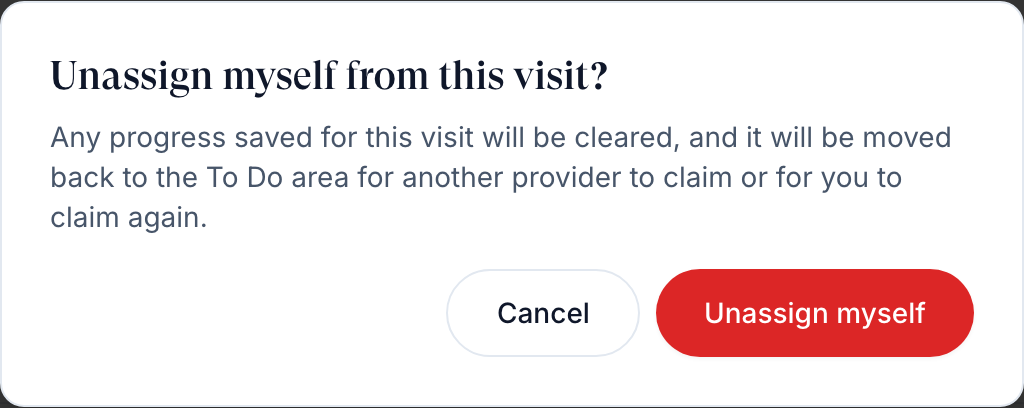
On In Progress, click Assigned to you on the row, then Unassign myself. Your saved progress on that visit is cleared and it returns to To Do.
You'll know it worked when the toast reads Review claimed and the visit sits in In Progress. After handing it back: Review unassigned.
Who can do this: Provider. Claiming needs an active, verified licence in the patient's state (unless your network turned off Require patient-state licensure) and a DEA number for controlled medications.
Pick up visits assigned to you
Use this to finish what is already yours, including visits staff assigned to you.
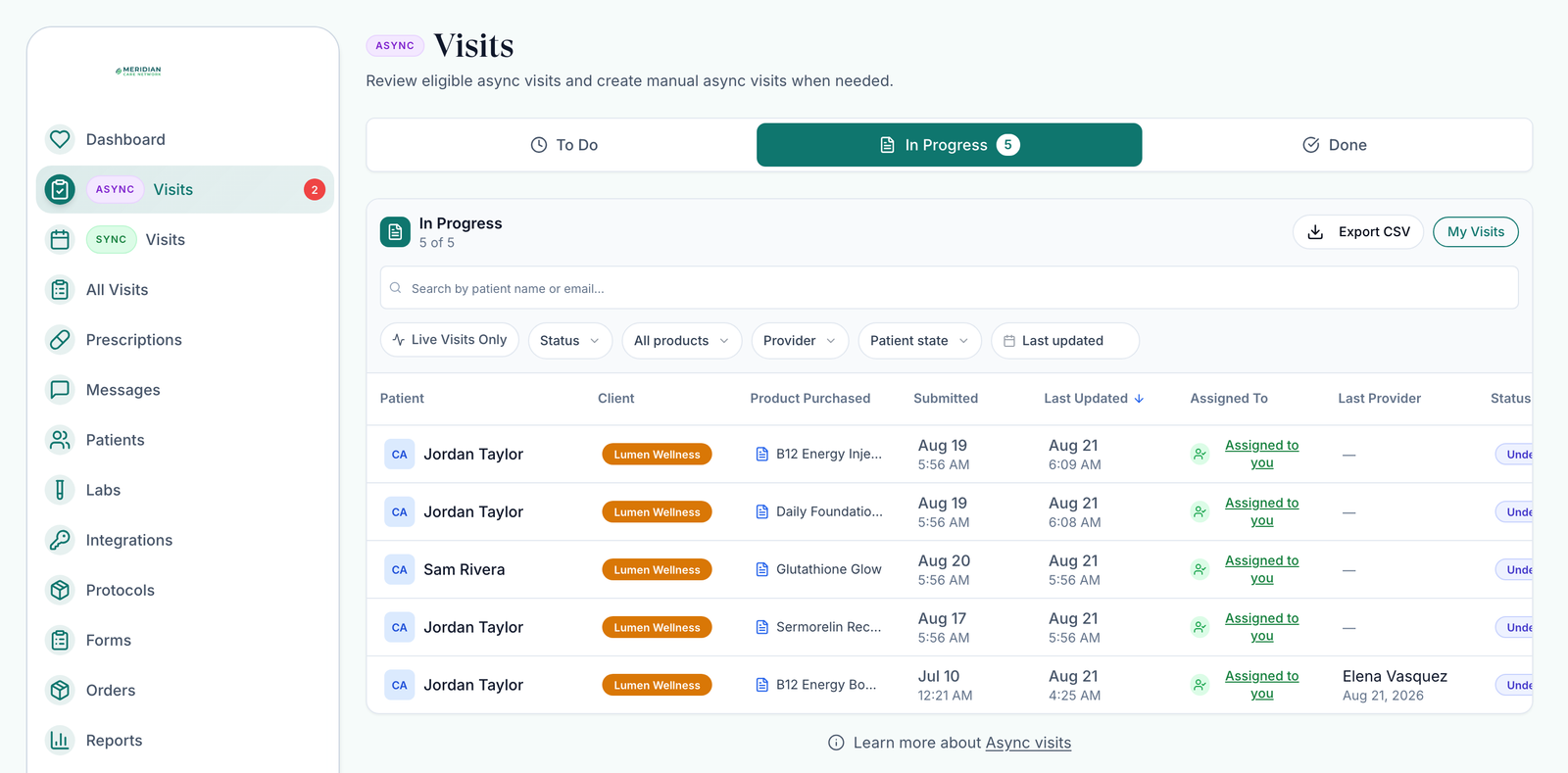
Open In Progress
A red count on the tab means new assignments. Status narrows to Under Review, Has SOAP or Unsigned prescription. My Visits switches to All Providers to see colleagues' visits read-only.
Click Start or Continue
Start opens a visit you haven't begun; Continue reopens one you have. On a laptop screen, scroll the table sideways to reach the button.
You'll know it worked when the charting window opens. See Charting window.
Who can do this: the Provider the visit is assigned to.
Bring back a visit waiting on the patient
Use this when you asked the patient for more with Need Clarification and want the visit back before they answer.
Find it
On In Progress, scroll to the Pending Patient Response table.
Move it back
Click Move to In Progress.
You'll know it worked when the toast reads Visit moved back to In Progress. Visits also come back on their own when the patient replies, or completes every form and lab you asked for.
Who can do this: the Provider who owns the visit, Provider Network Admins and Provider Delegates.
Reopen a finished review
Use this to reread a decision, or to prescribe on a visit you already approved.
Open Done
Done shows recent decisions; History below it lists older ones. Status filters Approved, Deferred, Sent to pharmacy, Denied and Voided.
Click View Summary
The chart opens with the decision locked. You can still write a prescription.
You'll know it worked when the chart shows The decision on this chart is recorded and can no longer be changed. You can still write a prescription.
Who can do this: Provider.
Assign or reassign a visit (admins)
Use this to move a visit to another provider, or give an unclaimed one to someone.
Find the visit
Open To Do or In Progress. Narrow with All clients, Provider or Patient state.
Open Assigned To
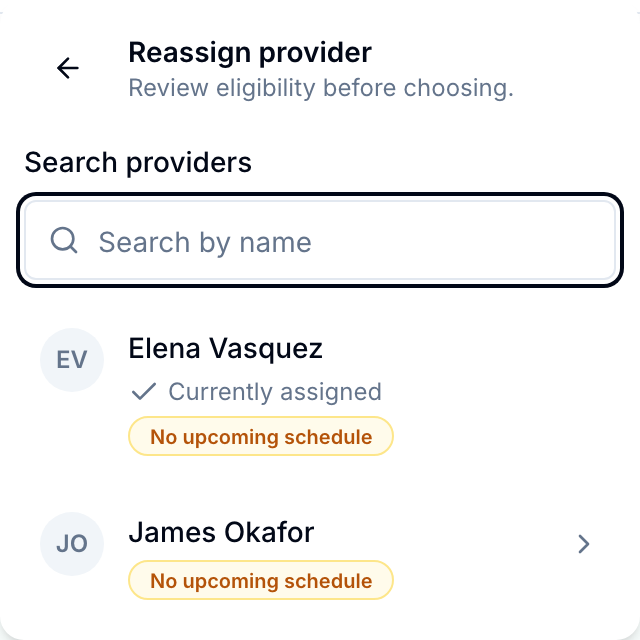
Click the provider's name in Assigned To (TBD when nobody has it), then Reassign provider or Assign provider.
Pick the provider
Badges show gaps such as No DEA on file, a missing state licence, or No upcoming schedule. Providers missing a licence or DEA can't be picked.
Confirm
Click Reassign provider (or Assign provider). If the provider isn't on that client yet, Assign & continue adds them.
You'll know it worked when the toast reads Assigned to and the provider's name, and the row shows them.
Who can do this: Provider Network Admin and Provider Delegate (Assign & continue is admin only). Unassign provider in the same menu sends the visit back to To Do. Reassigning or unassigning clears the previous provider's charting work.
There is no bulk reassign. Move visits one at a time; All Visits finds a provider's visits across the network.
What can go wrong
| What you see | Why | Fix |
|---|---|---|
| Claim greyed out: You are not licensed to practice in the patient's state | No verified licence for that state, or the patient's state on their profile is blank or wrong | Add the licence in My schedule → Credentials and ask your admin to verify it. Ask the client to correct the patient's address. |
| Claim greyed out: This encounter involves controlled medications and requires a provider with a DEA license. | No DEA number on your profile | Add it in Credentials → DEA Number, or ask your admin to reassign. |
| This Visit is missing its chart review link. (or canonical Visit link) | A data problem on that visit | Raise a ticket in Support with the patient's name. |
| Your admin sees a visit you don't | You aren't assigned to that client | Ask your admin to add the client under your profile's Capabilities → Assigned clients. |
| Only the provider who completed this review can edit it. | Another provider owns the visit | Ask your admin to reassign it to you. |
Questions people ask
Claiming fails with "This visit's protocol is not in your Preferred Protocols". Any tips?
Preferred Protocols no longer block claiming; they only filter My protocols. If Claim is greyed out, hover it for the real reason.
I can see patients from all states but can't claim a Florida patient, and I hold a Florida license.
The queue shows the whole network; you can claim only where your licence reads Verified in My schedule → Credentials. Also check the patient's state on their profile.
How do I unassign a visit?
Your own: In Progress → Assigned to you → Unassign myself. Someone else's: ask a Provider Network Admin, who uses Assigned To → Unassign provider.
Is there a way an async visit can be manually added?
No. Despite the page subtitle, async visits only come from patient orders and intakes. Ask the client to send the patient the product; for a one-off script, use Prescriptions → Create prescription.
How do we clear old test patients out of To Do and In Progress?
Click Void on the row, then Void visit; it can't be undone. Providers can void unclaimed visits on To Do (unless your network hides it); admins can void any open visit.
Related
Was this helpful?